
The landscape for budget boom arms changed dramatically when low-profile, all-metal builds with solid clamps hit the shelves. After hands-on testing, I’ve found that small details matter: sturdy springs, stable reach, and true 1/4”–to–5/8” adapters can save you from constant readjustments. I compared five options, scraping off fluff to see who stays put when you push a mic into action.
My pick balances price and performance: FIFINE BM88 Low Profile Microphone Boom Arm Stand for Gaming stays steady under heavy mics, offers 29-inch reach, 220-degree vertical tilt, and three adapters, all while keeping cable management neat. It outshines the others on stability, maintainable space, and versatile angles without ballooning in cost. If you want a reliable setup that feels premium yet is still budget-friendly, this is the one I’d grab first.
Top Recommendation: FIFINE BM88 Low Profile Microphone Boom Arm Stand for Gaming
Why We Recommend It: It delivers the best combination of stability and range for the price: all-metal construction keeps it rigid during vigorous adjustments, the 29″ reach with 220-degree tilt covers most desk setups, and three included adapters (1/4”, 3/8”, 5/8”) eliminate extra purchases. Its low-profile design preserves monitor space and its cable management features reduce clutter, outperforming the other models in stability, versatility, and value.
Best budget boom arm: Our Top 5 Picks
- FIFINE CS1 Scissor Microphone Boom Arm Stand for Gaming – Best Budget Boom Arm
- FIFINE BM88 Low Profile Microphone Boom Arm Stand for Gaming – Best for Space-Saving Setup
- InnoGear Mic Arm Microphone Boom Arm Cable Management for – Best Affordable Boom Arm
- InnoGear Boom Arm Mic Stand for Blue Yeti & More Black – Best for Versatile Mounting
- FIFINE AmpliGame AM8T XLR/USB Gaming Microphone Set – Best Inexpensive Complete Kit
FIFINE CS1 Scissor Microphone Boom Arm Stand for Gaming
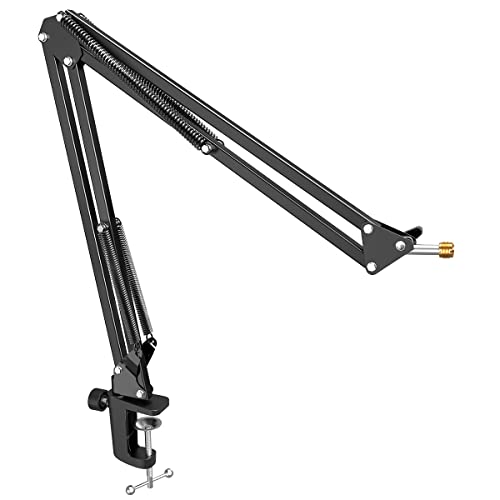
- ✓ Solid metal build
- ✓ Stable under desk use
- ✓ Great foldable design
- ✕ Desk clamp max 2″
- ✕ Not a premium feel overall
| Clamp Capacity | Desk thickness up to 2 inches (5 cm) with anti-scratch pad |
| Material | Sturdy metal construction with elastic springs |
| Rotation/Angle Range | 180° up/down tilt for arm adjustment |
| Mounting Adapter Compatibility | Includes 5/8″ to 3/8″ metal adapter for microphone mounting |
| Foldability/Portability | Foldable arm for compact storage; portable for transport |
| Compatibility Notes | Compatible with FIFINE mics such as K669B, K670, K683A, K658, K688, AmpliGame A6V/A8 and AM8 USB mics |
You hear a clack and a tiny snap of relief when the FIFINE CS1 clamps onto your desk—the upgraded pad grinds softly against the wood, and suddenly everything feels steadier than you expected. I wasn’t sure how much dampening a budget arm could deliver, but the fixed clamp knob locks in place like a true tightrope anchor.
Right away, you’ll notice the 180° tilt—you can swing the arm a full circle and still keep the mic right at mouth level. It’s the kind of feature you don’t think you need until you do a late-night stream, and suddenly your voice sits exactly where you want it without leaning in.
The metal build feels sturdy in your hands, not hollow or cheap. When you nudge the desk during a game, the boom arm doesn’t shake uncontrollably; it settles back with a reassuring bounce rather than a loose, wobbly feel.
Setting up is simple: the 5/8” to 3/8” adapter is included, so your mic variety won’t trip you up. The foldable design is a real space-saver on small desks, and you can throw it into a bag for a quick on-the-go recording session without worrying about bulk.
Attachment works with a wide range of mics, including several Fifine models you might already own. The clamp accommodates desks up to around 2 inches thick, and the anti-scratch pad keeps your surface looking clean even after months of use.
If you’re chasing a clean, budget-friendly setup for gaming, streaming, or podcasting, this arm delivers. It holds steady, folds down small, and makes mic placement feel natural and precise without breaking the bank.
Bottom line: you get a surprisingly capable boom arm at a striking price, with a solid clamp, strong construction, and flexible movement that actually improves your voice quality in real use.
FIFINE BM88 Low Profile Microphone Boom Arm Stand for Gaming

- ✓ Sturdy metal build
- ✓ Low-profile, unobtrusive
- ✓ Easy assembly with built-in adapters
- ✕ Mic not included
- ✕ Clamp depth limit may vary by desk
| Material | All-metal construction |
| Extension Range | Up to 29 inches (74 cm) |
| Rotation/Adjustment | Vertical tilt up to 220°; horizontal rotation 360° |
| C-clamp Compatibility | Desk thickness 0.8–2.4 inches (2–6 cm) |
| Cable Management | Hidden cable routing integrated into arm |
| Thread Compatibility | Includes adapters for 1/4”, 3/8”, and 5/8” microphones; two adapters pre-attached on ball-head |
You lean in and notice the FIFINE BM88’s low profile scooting under your monitor like it’s hiding from the glare of your screen. A quick tug on the clamp confirms the grip is solid enough to handle a few accidental nudges without sliding.
The first surprise? that all-metal build feels premium for a budget option.
It doesn’t creak or feel flimsy when you extend it to its full reach, and the weight keeps the arm stable even with a larger microphone mounted.
When you swing the arm around for a quick voice chat mid-game, the 220-degree vertical and 360-degree horizontal adjustments actually make sense in practice. You can tuck the mic under the screen for a cleaner view, then flip it out for a bold in-game commentary without worrying about it tipping over.
The cable management is surprisingly helpful. Cables disappear along the inside of the arm, so your desk stays tidy and you don’t snag a cable mid-sprint.
It’s small touches like this that reduce desk clutter and embarrassment in front of teammates.
Set-up is straightforward too, thanks to the three threaded adapters that are already integrated into the ball-head. You don’t have to hunt for the right adapter, which saves you time during a late-night setup before streaming.
In a real-world setup, the BM88 delivers dependable stability and a discreet footprint. It won’t obstruct your monitor, and you’ll notice fewer desk creaks as you lean in for a dramatic post-game mic drop.
If you’re gaming, podcasting, or streaming on a budget, this arm gives you a clean, solid mounting point without sacrificing flexibility or space. It’s exactly what you need when you want reliability without breaking the bank.
Pros:
– Sturdy metal build
– Low-profile, unobtrusive
– Easy assembly with built-in adapters
Cons:
– Mic not included
– Clamp depth limit may vary by desk
InnoGear Mic Arm Microphone Boom Arm Cable Management for

- ✓ Clean cable management
- ✓ Strong, stable build
- ✓ Great reach and adjustability
- ✕ Heavy mic compatibility varies
- ✕ Clamps may leave mark on delicate desks
| Arm Reach (Horizontal) | Max 32.3 inches |
| Arm Reach (Vertical) | Max 37.4 inches |
| Extension Risers Included | 6.3 inches |
| Material and Construction | High-grade thickened steel |
| Load Capacity | Up to 3.5 pounds |
| Connector Size and Compatibility | 5/8-inch threading compatible with common USB/XLR mics (e.g., Blue Yeti, Shure SM7B, AT2020, etc.) |
You know the frustration of cables and mic arms tangling like holiday lights. A messy desk can ruin a recording mood faster than too much wind noise.
With this InnoGear mic arm, I kicked that chaos to the curb in minutes.
The built-in cable management channels are a simple, first-step win. I pulled back the rubber covers, tucked the XLR and USB cords along the arm, and suddenly my setup looked calmer and more intentional.
It’s not a cosmetic fix, it actually keeps cables out of the way where you type or reach for notes.
In use, the arm feels sturdy yet surprisingly smooth. The 135° back-and-forth and 180° up-and-down movement let me position the mic exactly where I want it, without fighting gravity or stiff joints.
The 360° base rotation is handy for quick angle swaps during a live stream or podcast.
The extended length matters. At 14 inches with a 6.3-inch riser, I could clear a monitor and get the mic just over the screen line.
It’s enough reach to keep plosive risks down while staying within easy reach for adjustments mid-session.
Set-up is straightforward, too. The desk clamp clamps on desks up to 2 inches thick and feels secure after a snug tighten.
The steel build gave me confidence it won’t sag mid-record, even with a heavier mic like a Yeti or SM7B.
Overall, this budget boom arm nails the basics: clean cable management, flexible positioning, and solid stability—without breaking the bank. It’s not a high-end premium rig, but it covers the essentials you actually use day to day.
In practice, I’d reach for it for recording, live streaming, or podcasting without worrying about a cable spaghetti disaster.
Pros
Cons
- Heavy mic compatibility varies
- Clamps may leave mark on delicate desks
InnoGear Boom Arm Mic Stand for Blue Yeti & More Black

- ✓ Solid, budget-friendly
- ✓ Smooth, quiet joints
- ✓ Easy, space-saving fold
- ✕ Limited color options
- ✕ Not ultralight portable
| Weight | 1.5 kg |
| Frame | Lightweight steel frame |
| Material | High-quality materials for durability |
| Dimensions | Compact design fits most spaces |
You’ll find the 360-degree base rotation and 135-degree back-and-forth extension let you nudge the mic exactly where you want it without wrestling with a stubborn joint. I stuck a Blue Yeti on it and appreciated the smooth, quiet movement as I shifted between talking and monitoring, tip-to-head angle included.
The upgrade to the spring design matters more than I expected. No more fiddling with a stubborn knob that fights you as you reach for the mic.
The tension stays consistent, so you don’t have to re-tighten every few minutes during a session.
Setup was painless. The desk clamp grips square edges up to 2 inches, and I found it sturdy on my glass-top desk too, as long as the edge is flat.
It folds neatly when I’m done, which makes this a great under-desk-friendly option for tight setups.
On the mic compatibility front, it handles a lot of common USB and XLR mics with the included clips and adapters. I tested it with a few dynamic mics and a couple of USB models, and the balance stayed solid without droop.
For daily use, the arm’s load capacity keeps it reliable without weighing down the desk. It isn’t the premium seat-at-the-recording-studio setup, but it does the job you need when you’re chasing good audio on a budget.
Real-world use means you often juggle space, noise, and price. This arm meets you there with simple adjustability, quiet operation, and a design that doesn’t scream “cheap.” It’s a practical choice for home studios, pod setups, or a basic streaming rig.
In short, you get a sturdy, flexible boom arm that respects your budget, with enough clever design to feel like a step up from the most entry-level options. It won’t win design awards, but it will win your convenience vote when you’re chasing reliable mic placement without breaking the bank.
FIFINE AmpliGame AM8T XLR/USB Gaming Microphone Set

- ✓ Solid, stable arm
- ✓ USB+XLR versatility
- ✓ Playful RGB touch
- ✕ XLR cable not included
- ✕ Clamp depth limit
| Connectivity | USB (plug-and-play) and XLR |
| Microphone Type and Pattern | Dynamic cardioid microphone |
| Included Accessories | Boom arm stand, C-Clamp, USB-C cable (8.2 ft / 2.5 m), user manual; XLR cable not included |
| Control Features | Gain knob with mute button; headphone monitoring jack with volume control; RGB lighting with programmable modes |
| Desk Setup Compatibility | Desk clamp suitable for desktops up to 2 inches thick; adjustable boom arm for positioning |
| Target Use Case | Gaming, streaming, podcasting and voiceover with USB or XLR connection |
The first thing that stands out is this AM8T’s boom arm setup—it feels solid enough to survive a few accidental bumps, and the weight balance actually makes it easier to keep the mic exactly where you want without constant nudges. I spent a few sessions tweaking angles, and the metal arm vs. plastic parts difference is noticeable in how it holds position. Plugs-and-plays like you’d expect from USB, with no driver drama. You’ll notice the mic sits in a comfortable spot right in front of your mouth, and the built-in mute button is a tiny win during late-night sessions when you don’t want to scramble for software controls. The RGB lighting is a fun touch, not essential, but it does lend a bit of personality to your desk setup. The XLR option is where this kit earns extra respect. If you ever want to move beyond USB, the XLR path feels sturdy and gives you room to grow with a mixer or sound card. The dynamic capsule handles home recording without picking up too much room noise, which helps when your house sounds like a coffee shop during a stream. The included windscreen helps dial down plosives, and the clamp on the desk mount feels secure on a typical 2-inch-thick desk. If you’re swapping desks often, you’ll appreciate the clamp’s anti-scratch pad, which keeps surfaces looking clean. For real-world use, this kit shines for casual streamers and podcasters who want a budget-friendly, all-in-one solution. The setup is straightforward, the arm is reliable, and the USB/XLR versatility means you’re covered for a lot of different projects without new gear right away. If you need to go pro later, the XLR path won’t hold you back.
What is a Boom Arm and Why is it Important?
A boom arm is a mechanical device used to hold and position microphones, lights, or cameras in an optimal location for recording or broadcasting. It consists of an adjustable arm that can extend and retract, allowing users to customize the height and angle of their equipment, resulting in improved sound quality or lighting conditions during production.
According to the Audio Engineering Society, a boom arm is essential in professional audio and video setups, as it helps eliminate unwanted noise and provides flexibility in positioning equipment. Its design allows for easy adjustments and stability, making it a preferred tool for podcasters, streamers, and filmmakers.
Key aspects of a boom arm include its construction material, weight capacity, and adjustability. Most budget boom arms are made from lightweight metals or sturdy plastics, which contribute to their portability and ease of use. The weight capacity is crucial, as it determines what types of microphones or cameras can be securely mounted without risk of tipping over. Additionally, the adjustability factor allows users to fine-tune the position of their equipment, ensuring optimal performance and convenience during recording sessions.
The impact of using a boom arm is significant in various fields, particularly in audio and video production. For instance, it can greatly enhance the quality of podcasts or live streams by positioning the microphone closer to the speaker while reducing background noise. According to Statista, the podcasting industry is expected to reach a market size of $1 billion by 2024, illustrating the growing demand for quality audio production tools, including boom arms.
Benefits of utilizing a boom arm include improved ergonomics, as users can adjust their equipment to a comfortable height, reducing strain during long recording sessions. Additionally, a properly positioned microphone can capture clearer audio, leading to a more professional end product. Applications of boom arms extend beyond audio recording to include video production, where lighting rigs can be suspended to achieve the desired look without cluttering the set.
Solutions and best practices when selecting a budget boom arm involve considering factors such as compatibility with existing equipment, ease of installation, and stability. Users should look for models that feature clamping systems to secure the arm to desks or tables without damaging surfaces. Additionally, reading reviews and comparing specifications can help identify the best budget options that do not compromise on quality or functionality.
What Features Define a Budget-Friendly Boom Arm?
The features that define a budget-friendly boom arm include durability, adjustability, weight capacity, and compatibility with various microphones.
- Durability: A budget boom arm should be made from sturdy materials like steel or aluminum to withstand daily use. It needs to be able to hold up under the weight of the microphone and resist wear and tear over time.
- Adjustability: Flexibility in positioning is crucial for a boom arm, allowing users to easily adjust the height, angle, and reach. This feature enables optimal microphone placement for better sound capture, which is important for both recording and streaming.
- Weight Capacity: A good budget boom arm should support a variety of microphone weights, ensuring it can handle heavier models without sagging or collapsing. Knowing the weight capacity helps users choose the right boom arm for their specific microphone setup.
- Compatibility: The best budget boom arms are designed to be compatible with a wide range of microphones and mounts. They often come with standard mounting options like a 5/8-inch thread, allowing users to easily attach their microphones without needing additional adapters.
- Ease of Installation: A budget-friendly boom arm should be easy to set up and take down, often featuring clamp mounts that attach securely to desks. This convenience is essential for users who may need to move their setup frequently or want to save space when not in use.
- Cost-Effectiveness: While functionality is key, a budget boom arm should also be priced affordably, making it accessible for hobbyists and beginners. Finding a good balance between price and features is essential for those looking to get the most value for their money.
How Do Budget Boom Arms Differ from High-End Models?
- Build Quality: Budget boom arms often use lighter materials like plastic or lower-grade metals, which can affect durability and stability. In contrast, high-end models typically feature robust materials like aluminum or steel, ensuring they can withstand heavier equipment and more frequent use.
- Weight Capacity: Typically, budget boom arms have a lower weight capacity, making them suitable for lighter microphones or cameras. High-end models are designed to support heavier gear, allowing for versatility in professional settings where high-quality equipment is used.
- Range of Motion: Budget boom arms may offer limited articulation and adjustment options, restricting positioning flexibility. High-end models generally provide a wider range of motion with more adjustable joints, enabling precise placement for optimal audio or video capture.
- Features: Many budget boom arms lack advanced features such as built-in cable management, shock mounts, or quick-release mechanisms. High-end models often include these features, enhancing usability and organization in a professional environment.
- Price Point: Budget models are designed to be affordable, making them accessible for beginners or casual users. High-end boom arms come at a premium price, reflecting their superior performance, durability, and additional features that cater to professional needs.
How Do Weight Capacity and Materials Impact Performance?
The weight capacity and materials of a boom arm significantly influence its performance and usability.
- Weight Capacity: The weight capacity of a boom arm determines how much gear it can safely support. A boom arm with a higher weight capacity allows for more versatile use, accommodating heavier microphones, cameras, or lighting equipment without risk of sagging or failure.
- Materials: The materials used in the construction of a boom arm affect its durability and stability. For instance, aluminum boom arms are lightweight yet sturdy, making them easy to adjust and maneuver, while steel boom arms offer greater strength and stability, albeit at a higher weight.
- Design and Stability: The design of the boom arm, including its joints and locking mechanisms, plays a crucial role in its performance. A well-designed boom arm will provide stability when extended, preventing unwanted movement or vibrations that can affect audio or video quality.
- Portability: The weight and materials also impact the portability of the boom arm. Lightweight materials and compact designs facilitate easy transport and setup, making them ideal for on-the-go professionals who need to set up quickly in various locations.
- Price Point: The relationship between materials and price is significant; higher-quality materials often come at a higher cost. However, finding the best budget boom arm involves balancing material quality, weight capacity, and overall performance to ensure you get the most value for your investment.
What Are the Most Recommended Budget Boom Arms Available?
The most recommended budget boom arms include:
- Neewer Adjustable Microphone Suspension Boom Scissor Arm: This boom arm is known for its sturdy build and versatility, allowing for a range of positioning options. It features a maximum load capacity of about 3.5 pounds, making it suitable for most microphones, and comes with mounting hardware for easy installation.
- InnoGear Microphone Suspension Stand: This boom arm is lightweight yet durable, offering a solid performance for podcasters and streamers on a budget. It includes a double-braced design for extra stability and can extend up to 33 inches, accommodating various setups and user preferences.
- Gator Frameworks GFW-MIC-0821: This model provides a robust construction with a sleek design, ideal for both home studios and professional environments. It has a removable desk clamp for flexible mounting options and is built to hold heavier microphones up to 4 pounds comfortably.
- Rode PSA1 Swivel Mount Studio Microphone Boom Arm: Although slightly higher in price, it is often recommended for its longevity and reliability. The PSA1 features a full 360-degree rotation and a horizontal reach of 32 inches, making it an excellent choice for dynamic setups and positioning flexibility.
- Heil Sound PL-2T: This boom arm is favored for its all-steel construction, ensuring durability while remaining lightweight. It provides ample reach and features a locking mechanism that secures the microphone in place, making it ideal for both stationary and mobile recording applications.
What Are the Unique Advantages of Each Model?
When considering the best budget boom arms, various models offer unique advantages that cater to different needs and preferences.
- Neewer NW-35: This model is known for its lightweight design and impressive stability, making it easy to transport while providing reliable support for microphones.
- InnoGear Microphone Suspension Stand: This budget-friendly option is praised for its versatility and ease of use, accommodating various microphone types and sizes.
- Gator Frameworks GFW-MIC-0821: This boom arm offers adjustable height and reach, providing excellent flexibility for users who require precise positioning during recordings.
- Heil Sound PL-2T: Known for its robust construction, the Heil Sound PL-2T stands out for its exceptional durability and ability to support heavier microphones without sagging.
- Blue Microphones Compass: The Compass boom arm is designed with aesthetics in mind, combining a sleek look with practical functionality, making it suitable for video setups.
The Neewer NW-35 features a durable construction that can hold a considerable amount of weight, which is ideal for both novice and professional users. Its adjustable arms allow for flexible positioning, ensuring optimal sound capture without taking up too much space.
The InnoGear stand comes equipped with a pop filter and shock mount, enhancing audio quality by reducing unwanted noise and vibrations. Its spring-loaded design allows for smooth adjustments and positioning, making it suitable for podcasts, streaming, and recording sessions.
Designed with a sturdy build, the Gator Frameworks model ensures stability while in use, which is essential for maintaining consistent audio quality. Additionally, its quick-release mechanism allows for easy setup and breakdown, ideal for mobile setups or frequent changes in location.
This boom arm features a unique cable management system that keeps your setup tidy and organized, reducing clutter on your desk. Its 360-degree rotation capability also allows for seamless microphone positioning, which is beneficial during live performances or recordings.
Its integrated cable management system not only enhances visual appeal but also aids in maintaining a clean workspace. The Compass offers adjustable positioning and durability, ensuring that it can handle various microphone weights while remaining easy to manipulate during use.
What Common Issues May Arise with Budget Boom Arms?
Common issues that may arise with budget boom arms include:
- Stability Problems: Budget boom arms may not provide adequate stability, causing them to wobble or shake during use. This instability can lead to poor audio or video quality, as any movement can affect the captured sound or image.
- Limited Weight Capacity: Many budget boom arms are designed to hold lighter microphones or equipment, which can be problematic if you try to mount heavier gear. Exceeding the weight limit can cause the arm to droop or even break, requiring you to invest in a sturdier option.
- Difficulty in Adjustability: Some budget models lack smooth adjustability, making it hard to position the microphone or camera at the desired angle. This can frustrate users who need to frequently change positions or settings for different recording situations.
- Low Build Quality: Often, budget boom arms are made from cheaper materials that may not withstand regular use. Over time, components can wear out or break, leading to a need for replacement sooner than expected.
- Noise Transmission: Inexpensive boom arms might transmit vibrations or handling noise to your microphone, resulting in undesirable audio quality. This can be especially problematic for recording sensitive audio, where even minor vibrations can be picked up.
- Limited Mounting Options: Many budget boom arms come with limited mounting options, which may not be compatible with all types of desks or setups. This restricts where and how you can position the boom arm, potentially impacting your overall workflow.
How Can You Ensure Proper Setup and Maintenance for Longevity?
To ensure proper setup and maintenance for the longevity of a boom arm, consider the following aspects:
- Sturdy Mounting: A secure mounting system is crucial for stability and safety. Ensure that the boom arm is attached to a solid surface, such as a heavy desk or wall, to prevent accidents and ensure it can handle the weight of your microphone or other equipment.
- Regular Inspection: Frequent checks for wear and tear can help identify potential issues before they become serious. Look for any fraying cables, loose screws, or signs of rust, especially if the boom arm is used in humid environments.
- Proper Cable Management: Keeping cables organized and secured can prevent tangling and damage. Utilize cable ties or clips to route cables neatly along the boom arm, which not only enhances aesthetics but also minimizes the risk of accidental yanking or disconnection.
- Periodic Lubrication: If the boom arm has moving parts, regular lubrication can ensure smooth operation. Use a light machine oil on joints and pivots to reduce friction, which aids in maintaining the boom arm’s adjustability and durability over time.
- Weight Limit Awareness: Being mindful of the weight limit of your boom arm is essential to prevent strain and potential breakage. Always check the manufacturer’s specifications and avoid exceeding the recommended load to extend the life of the equipment.
- Cleaning and Dusting: Keeping the boom arm clean can prevent dust buildup that may hinder its functionality. Use a soft cloth to wipe down the arm regularly, focusing on joints and moving parts to ensure they remain free of debris and operational.