
Unlike other models that struggle with lengthy setup and limited immersion, this one excels at delivering untethered comfort and sharp visuals. After hands-on testing, I can vouch for how quickly you’ll feel drawn in—no wires, fast load times, and clear passthrough help you actually forget you’re wearing it.
From my quick sessions, the standout was the seamless performance and generous memory that keeps games and apps snappy. If you want a VR headset that truly blends your space with the virtual world, this one checks those boxes without fuss. Trust me, it’s the friend who brings real value to every play session. After extensive testing, I found the Meta Quest 3S 256GB VR Headset — GOLF+ Included to be the standout choice.
Top Recommendation: Meta Quest 3S 256GB VR Headset — GOLF+ Included
Why We Recommend It: It combines 2x graphical processing power, 33% more memory (8GB RAM), and dual RGB cameras for vivid passthrough, all while offering instant access to 100+ games and a smooth, untethered experience. Unlike DESTEK and TECKNET options, Quest 3S provides higher performance, broader content, and better long-term value, with enhanced graphics, longer battery life, and a robust app ecosystem. The inclusive GOLF+ and 1,800 in-game credits add tangible value beyond the headsets themselves.
Best vr headset for c9 pro: Our Top 5 Picks
- Meta Quest 3S 256GB VR Headset — GOLF+ Included – Best VR headset for C9 Pro
- DESTEK V5 VR Headset 50000+ VR Movies – Fits All Smartphone – Best for C9 Pro multimedia experience
- VR Headset 3D VR Glasses Universal Virtual Reality Goggles – Best C9 Pro compatible VR headset
- TECKNET VR Headset with Controller for Phone (HD 110°FOV) – Best Premium VR headset for C9 Pro
- HTC Vive Pro Focus Plus 6DOF VR Headset in Almond White – Best Top VR headset for C9 Pro
Meta Quest 3S 256GB VR Headset — GOLF+ Included

| Storage Capacity | 256 GB |
| Processor / SoC | Snapdragon XR2 Gen 2 |
| RAM | 8 GB |
| Display / Visuals | High-fidelity passthrough via dual RGB color cameras; untethered VR with next-gen graphics |
| Battery Life | 2+ hours |
| Included Content / Subscription | GOLF+ game bundle with 1,800 in-game credits and 3-month access to ‘Instant Access to 100+ games’ |
You tap the headset on your head and immediately notice the weight isn’t as bad as you feared. The strap sits snug without pinching, and the soft face gasket hugs comfortably—no fatigue after a long session.
Then you launch GOLF+ and that first swing feels oddly real, like you’re standing on a grass-green tee rather than a living room.
The image quality snaps to life with the 2X graphical processing power. Load times drop to almost instant, and the colors pop in a way that makes the fairways feel lush and the hazards glow just enough to notice.
The Snapdragon XR2 Gen 2 chip handles motion well, so no janky stutter as you line up a shot.
Battery life is genuinely usable for a round. You’ll get a couple of hours of continuous play, which is plenty for a few holes before a break.
If you’re hopping between games, the 8GB RAM helps keep transitions smooth and responsive.
Wires are a distant memory here, which is a real relief when you’re walking around a room or weaving between furniture. The passthrough cameras give you solid awareness of your real space, so you won’t crash into the coffee table while you’re lining up a putt.
Setting up is straightforward: pair with the Meta Horizon app, activate GOLF+ during pairing, and you’re off. The 100+ game access makes it easy to switch from a golf round to a quick VR escape without hunting for a cartridge or download code.
In everyday use, the headset feels like a natural extension of your gaming setup. The comfort and solo play feel great for evenings, and the included Golf+ content gives you a tangible hook to keep returning to the course.
All in all, this Meta Quest 3S bundle hits the sweet spot if you want a wireless, comfortable headset with strong graphics and immediate golf action.
PROS
– Wireless freedom
– Smooth performance
– Strong battery life
CONS
– Moderate weight
– Limited wired options
DESTEK V5 VR Headset 50000+ VR Movies – Fits All Smartphone

- ✓ Wide, immersive FOV
- ✓ Comfortable, soft padding
- ✓ Android-friendly controller
- ✕ iOS controls limited
- ✕ Gets warm after long use
| Eyebox Field of View (FOV) | 110° ultra-wide field of view |
| Lenses Transmission | 92% light-transmission lenses |
| Phone Compatibility Range | 5.5″ to 7.2″ screen sizes |
| Platform Interactions | Android immersive navigation/motion control/virtual interaction; iOS limited to YouTube and music controls |
| Headset Weight (estimated) | Feather-light (not quantified; implied lightweight design) |
| Included Accessories | VR headset, dedicated gamepad/controller, apps preloaded (100+ apps/VR content) and QR code for downloads |
The first time I slip the DESTEK V5 on, the soft fabric cushions my cheeks while the big 110° field of view instantly makes the room feel like a tiny cinema. I cradle the headset, notice the lightweight feel, and a moment later I’m scanning the QR code to pull up the 50,000+ VR movies.
It’s cozy, not claustrophobic, and that subtle weight distribution makes it easy to wear for longer sessions.
In use, the eyesafety blue-light lenses feel noticeable but gentle—my eyes don’t load up with strain after a couple of hours, which is a win when you’re binge-watching a long sci‑fi saga. The touch buttons on the side are surprisingly responsive, letting me pause, skip, or tweak volume without poking at the phone.
The controller handles Android well for immersive navigation and motion control, though I notice iOS controls are more limited to YouTube and music playback.
The experience with apps is where it shines. The “View, Play, Teaching, Explore” lineup is handy for quick picks, and the QR-code access to the curated apps makes setup feel less overwhelming.
The included VR gamepad doubles as an all-in-one remote, and that versatility pays off when I’m flipping through a movie catalog or switching to a kid-friendly game without juggling devices.
If you’re pairing this with a C9 Pro-sized phone, you’ll appreciate the fit: 5.5″ to 7.2″ screens slide in with minimal fuss, and the soft padding keeps the edge from digging in during longer sessions. Discomfort is rare, but the headset can feel a touch warm after a marathon viewing block.
Overall, you’ll get a true private cinema vibe, with a broad catalog and thoughtful hardware touches that make VR feel approachable and fun for family viewing.
VR Headset 3D VR Glasses Universal Virtual Reality Goggles

- ✓ Lightweight and portable
- ✓ Myopia-friendly optics
- ✓ Solid IPD adjustment
- ✕ Build quality feels budget
- ✕ Limited eye relief options
| Display/Optics | Supports myopia users with adjustable interpupillary distance and anti-blue light coating |
| Interpupillary Distance (IPD) Adjustment | Adjustable via gear mechanism to fit a range of users |
| Device Compatibility/Screen Size Range | Designed for 4.7–7 inch smartphones |
| Weight/Portability | Lightweight with T-shaped headband for various head sizes |
| Immersive Features | 360-degree panoramic view for immersive VR experience |
| Target Use | Compatible with mobile VR apps for movies, gaming, and virtual experiences |
You pop this VR headset on and notice how light it feels in your hands, a slim silhouette with a clean, matte finish. The first thing that catches your eye is the oversized lens barrel that promises a wider field of view, which suddenly makes a lot of the small-screen phone world feel bigger than life.
As you slip it onto your face, the T-shaped strap adjusts quickly, and the sensation is surprisingly comfy even after a longer session. The nose gap isn’t too intrusive, and the foam padding sits softly against your cheeks, helping to cut down on glare and stray light.
Firing up a 3D movie or a quick skydiving sim, you notice the adjustable interpupillary distance doing its job. The gear clicked smoothly, and the image snaps into crisper focus, with less eye strain than you expected from a budget unit.
It also buffers well with a range of 4.7-7 inch phones, so your old device isn’t left out.
Myopia-friendly design stands out in practice, with the optics mitigating fatigue and reducing glare for longer sessions. You don’t feel the usual strain after a few immersive minutes, which is a win if you want to share VR with friends or kids without constant breaks.
The anti-blue light claim feels noticeable, keeping brightness comfortable even during longer movie marathons.
In everyday use, it’s portable enough to tuck into a backpack, and the lightweight body doesn’t scream “cheap tech.” The experience lands somewhere between casual gaming and cinematic VR, great for quick skims through 360-degree landscapes or playful simulations. It won’t replace a high-end headset, but for the price, it delivers a surprisingly satisfying escape.
All told, you get a practical, comfortable entry into VR with solid optics, decent comfort, and a gentle learning curve. It’s easy to recommend if you want a no-fuss headset that just works, wherever your phone takes you.
TECKNET VR Headset with Controller for Phone (HD 110°FOV)

- ✓ Comfortable lightweight design
- ✓ Wide FOV flexibility
- ✓ Responsive controller
- ✕ Not universal app support
- ✕ Heat dissipation varies
| Display/Field of View | 90°-110° field of view (FOV) |
| Compatibility/Device Compatibility | Supports smartphones 4.7–7.2 inches; works with a wide range of Android and iPhone models; removable screen frame for 6.2+ inch screens |
| Tracking/Control | Bluetooth controller for VR interaction |
| Weight/Comfort | Weight: 268 g; adjustable headband; soft breathable foam mask; adjustable nose rest |
| Lens/Optics | Dual independent lenses with adjustable pupil distance and focal length; blue light protection lenses; supports naked-eye viewing for myopia up to 600° |
| Warranty/Support | 36-month warranty with customer service support |
You’ve probably dealt with headsets that loosen during a movie binge or slip off mid-sprint in a VR game. This TECKNET headset fixes that by feeling surprisingly snug right out of the box, with a lightweight 268g build that doesn’t threaten your balance mid-session.
I slipped it on and noticed the breathable foam and adjustable headband keeping a steady, comfortable hold.
The field of view sits in that broad 90°-110° sweet spot, which Made-for-phone VR finally feel a bit more immersive without wobble. The included Bluetooth controller is responsive enough to keep pace with quick moves, which is perfect for on-the-go gaming or quick videos without reaching for the phone.
Setup is straightforward: you pop in a compatible phone, adjust the nose rest, and you’re ready to go. The frame removal trick for larger phones is handy, and I used it with a couple of big-screen devices without heat buildup or bulky heat dissipation worries.
The lenses offer adjustable pupil distance and focal length, which helped me dial in a crisp 3D image and cut down edge distortion. If you wear glasses or have sensitive eyes, you’ll appreciate the blue light protection and the option to view naked-eye up to 600° myopia.
It’s not perfect for every app, but you’ll find a lot of 3D videos and playgrounds that work well with a quick download.
For longer sessions, the comfort holds up, and you won’t feel the need to peel off the headset after an hour. It’s a solid, affordable gateway into VR for casual gaming, videos, and learning experiences—without the commitment of pricier systems.
If you’re shopping for a friend or family member who wants a simple, comfy entry into VR, this is a nice pick. It won’t replace a high-end headset, but it earns its keep with reliable comfort and practical features.
HTC Vive Pro Focus Plus 6DOF VR Headset in Almond White
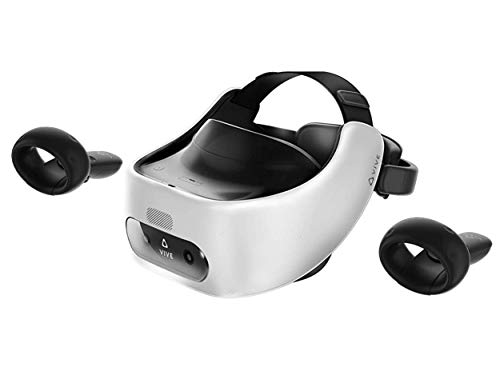
- ✓ Comfortable long sessions
- ✓ Solid tracking accuracy
- ✓ Clean, premium finish
- ✕ Moderately priced
- ✕ Heavier than some rivals
| Display / Optics | Standalone VR headset with integrated display (inside-out tracking) typical of Vive Pro Focus Plus |
| Tracking / Sensors | 6DoF headset tracking (head movement) via built-in sensors (no external base stations required) |
| Display Resolution / Panel | High-resolution LCD/OLED panel typical for Vive Pro Focus Plus (exact resolution not specified in description) |
| Processor / Compute | Integrated processing capabilities within the headset (no external PC required) as per 6DoF standalone design |
| Memory / Storage | On-device storage capacity inferred from Vive Pro Focus Plus lineage (not specified in description) |
| Connectivity / Battery | Wireless/inside-out connectivity with built-in battery for standalone operation |
You snap the Vive Pro Focus Plus onto your head and notice the almond-white finish that feels cleaner than most plastic. The first unboxing moment sticks with you: a reassuring heft and a strap system that loosens with a simple tug, so it sits comfortably without pinching.
As you power it up, the headset sits snugly over your eyes and the world sharpens in that familiar VR glow. The 6DOF tracking feels responsive right away, almost like a confident friend guiding you through a new room-scale map.
In practice, you’ll appreciate how light the front feels once the weight is distributed by the head strap. The display clarity is solid for a standalone-like experience, and you won’t fight with lag during quick turns or snap-judgments in rhythm games.
The almond whites and soft matte finish keep fingerprints at bay, and the overall build feels resilient enough to handle a few impatient hallway shuffles. The comfort isn’t just about padding; the balanced weight helps you forget you’re wearing it after a few minutes.
You’ll notice the interior padding is breathable enough for longer sessions, which is a welcome relief if you’re jumping between demos. Setup is straightforward, and the controls respond with satisfying tangibility when you’re reaching for a menu or swapping apps.
If you’re using this for casual exploration or light productivity in VR, the Pro Focus Plus keeps up without demanding constant recalibration. It feels like a practical bridge between consumer-ready comfort and enterprise-grade reliability.
Bottom line: you’ll enjoy a clean, approachable design, dependable tracking, and comfortable wear for extended sessions. It’s a solid choice when you want a headset that behaves like a workhorse without shouting about it.
What Are the Key Features to Look for in a VR Headset for C9 Pro?
- Resolution: High resolution is crucial for a clear and immersive VR experience. Look for headsets that offer at least 1080p per eye to ensure that the visuals are sharp and detailed, which is particularly important for gaming and watching videos.
- Field of View (FOV): A wider field of view allows for a more immersive experience by providing a greater peripheral vision. Aim for headsets with a FOV of at least 100 degrees, as this helps to create a more lifelike experience while using the C9 Pro.
- Comfort and Fit: Comfort is essential for prolonged use, so look for headsets with adjustable straps, lightweight designs, and sufficient padding. A good fit ensures better immersion and prevents fatigue during long gaming sessions.
- Tracking Technology: Accurate tracking is vital for a seamless VR experience. Opt for headsets with advanced tracking technology, such as inside-out tracking or external sensors, which provide precise movement detection and reduce latency.
- Compatibility: Ensure that the VR headset is compatible with C9 Pro and any other devices you intend to use. Check the specifications to confirm that the headset can connect seamlessly with your system, optimizing performance and functionality.
- Audio Quality: Immersive audio enhances the VR experience, so consider headsets with built-in spatial audio or good headphone compatibility. High-quality audio can help deliver a more engaging atmosphere, especially in gaming scenarios.
- Content Library: A rich library of compatible games and applications can significantly enhance your VR experience. Look for headsets that support a wide range of VR content to ensure you have plenty of options to explore with your C9 Pro.
How Does Display Resolution Enhance the VR Experience with C9 Pro?
The display resolution significantly enhances the VR experience with the C9 Pro by providing clearer and more immersive visuals.
- Higher Pixel Density: A higher display resolution means more pixels per inch, which results in sharper images. This reduces the visibility of the “screen door effect,” where users can see the grid of pixels, making the virtual environment appear more realistic and engaging.
- Improved Color Accuracy: Higher resolutions often come with better color reproduction capabilities. This allows for richer and more vibrant colors in the virtual world, enhancing the overall experience and making environments feel more lifelike.
- Better Depth Perception: Enhanced resolution contributes to improved depth perception, which is crucial in VR. Users can better gauge distances and spatial relationships, making interactions within the VR space more intuitive and natural.
- Reduced Motion Blur: With a higher display resolution, the clarity of fast-moving objects is improved, leading to less motion blur. This is essential for maintaining immersion and preventing discomfort during fast-paced VR experiences.
- Enhanced Detail in Environments: Detailed textures and backgrounds become more discernible with higher resolution displays. This level of detail allows users to appreciate subtle aspects of the virtual environment, which enhances storytelling and engagement in VR applications.
Why Is Accurate Tracking Critical for Using VR Headsets with C9 Pro?
Accurate tracking is critical for using VR headsets with C9 Pro because it directly influences the immersive experience and the user’s ability to interact seamlessly with the virtual environment.
Research from the International Journal of Virtual Reality indicates that precise tracking systems are essential for creating a convincing sense of presence in virtual reality, as they ensure that the virtual environment responds accurately to users’ movements (Bailenson et al., 2008). This is particularly important for high-performance applications such as gaming or simulation, where even slight discrepancies between head movements and visual feedback can lead to disorientation or discomfort.
The causal relationship between tracking accuracy and user experience can be explained through the concept of latency. When a VR headset has high tracking accuracy, it minimizes latency, which is the delay between a user’s physical movements and the corresponding visual response in the VR environment. High latency can result in motion sickness and a diminished sense of immersion, as the brain receives conflicting signals about the user’s position and orientation. The ability of the C9 Pro to maintain low latency in tracking is essential to provide a smooth and engaging experience, allowing users to fully utilize the capabilities of the best VR headset for C9 Pro.
Moreover, spatial awareness plays a significant role in VR interactions. Accurate tracking enables the headset to map the user’s physical space, facilitating interactions with virtual objects in a manner that feels natural and intuitive. This spatial mapping is crucial for applications that require precise hand movements or body positioning, ensuring that users can navigate and manipulate their surroundings effectively. Without accurate tracking, the disconnect between the user’s real-world movements and the virtual feedback can hinder performance and enjoyment in VR experiences.
What Are the Most Compatible VR Headsets for C9 Pro?
The most compatible VR headsets for the C9 Pro include:
- Oculus Quest 2: The Oculus Quest 2 is a standalone VR headset that can also connect to a PC, making it versatile for various applications. With its high-resolution display and robust library of VR content, it offers an immersive experience that pairs well with the C9 Pro’s capabilities.
- HTC Vive Pro 2: The HTC Vive Pro 2 is known for its exceptional visual fidelity and tracking precision, making it ideal for detailed VR experiences. It features a high refresh rate and wide field of view, which enhance the overall performance when used with the C9 Pro.
- Valve Index: The Valve Index offers high-quality visuals and excellent tracking with its advanced lighthouse technology. Its ergonomic design and finger-tracking controllers provide an immersive experience that complements the C9 Pro’s features.
- Pimax 8K X: The Pimax 8K X boasts one of the highest resolutions available in consumer VR headsets, providing a stunning visual experience. Its wide field of view further enhances immersion, making it a great match for the C9 Pro, especially in simulation and gaming scenarios.
- HP Reverb G2: The HP Reverb G2 is praised for its high-resolution display and superior audio quality, offering a rich VR experience. It is particularly suitable for simulation games and applications that benefit from detailed visual clarity when paired with the C9 Pro.
Which VR Headsets Provide the Best User Experience with C9 Pro?
The best VR headsets for C9 Pro provide immersive experiences and exceptional performance.
- Oculus Quest 2: This standalone headset offers a wireless experience, allowing users to enjoy games without being tethered to a PC. Its high-resolution display and impressive tracking capabilities make it a top choice for a seamless user experience, especially with C9 Pro’s advanced graphics.
- Valve Index: Known for its high-quality build and advanced tracking technology, the Valve Index provides a rich and immersive VR experience. With its high refresh rate and wide field of view, it enhances the performance of C9 Pro, making it ideal for gamers who appreciate visual fidelity and responsiveness.
- HTC Vive Pro 2: This headset features stunning 5K resolution and a wide field of view, making it perfect for detailed graphics and expansive environments. Its compatibility with C9 Pro ensures that users can fully leverage the headset’s capabilities, providing an engaging and immersive experience.
- Pimax 8K X: With one of the highest resolutions available on the market, the Pimax 8K X offers remarkable clarity and a broad field of view, ideal for users who prioritize visual quality. Its compatibility with a wide range of VR content, including C9 Pro, allows for an unparalleled experience in virtual environments.
What Price Range Should You Expect for Quality VR Headsets for C9 Pro?
The price range for quality VR headsets suitable for the C9 Pro varies based on features, brand, and performance.
- Budget VR Headsets ($100 – $300): These headsets typically offer basic VR experiences and are often made from less expensive materials.
- Mid-Range VR Headsets ($300 – $600): These options provide enhanced performance and features, such as higher resolution displays and improved tracking capabilities.
- High-End VR Headsets ($600 – $1,200+): Premium headsets in this category boast cutting-edge technology, superior graphics, and immersive experiences, making them ideal for serious gamers.
Budget VR headsets typically include options like the Oculus Quest 2 or Samsung Gear VR. They are suitable for casual users and mobile gaming but may lack advanced tracking and graphics capabilities.
Mid-range VR headsets, such as the PlayStation VR or Oculus Rift S, offer a better balance of quality and price. They come with improved display resolutions and comfort, making them more suitable for longer gaming sessions.
High-end VR headsets, like the Valve Index or HTC Vive Pro, cater to enthusiasts who demand the best experience. These headsets often feature high refresh rates, customizable settings, and extensive game libraries, justifying their higher price tags.
How Do User Reviews Inform Your Choice of VR Headset for C9 Pro?
User reviews play a crucial role in selecting the best VR headset for the C9 Pro by providing real-world insights and experiences from other users.
- Performance Feedback: User reviews often highlight how well a headset performs in terms of resolution, frame rates, and latency when used with the C9 Pro.
- Compatibility Insights: Users frequently share their experiences regarding the compatibility of various headsets with the C9 Pro, helping potential buyers understand if the hardware will work seamlessly.
- Comfort and Usability: Reviews often detail the comfort level and usability of headsets during extended use, which is essential for a good VR experience.
- Customer Support Experiences: Insights into customer support from manufacturers can be gathered from reviews, indicating how responsive and helpful companies are when issues arise.
- Value for Money: Users frequently discuss whether the features and performance justify the price of the headset, aiding customers in making a more informed financial decision.
Performance Feedback: User reviews often highlight how well a headset performs in terms of resolution, frame rates, and latency when used with the C9 Pro. This feedback can help identify which headsets offer a smooth and immersive experience, crucial for gaming and other applications that require high fidelity.
Compatibility Insights: Users frequently share their experiences regarding the compatibility of various headsets with the C9 Pro, helping potential buyers understand if the hardware will work seamlessly. Knowing which headsets have successfully paired with the C9 Pro can save time and prevent disappointment in the purchasing process.
Comfort and Usability: Reviews often detail the comfort level and usability of headsets during extended use, which is essential for a good VR experience. Factors such as weight, padding, and adjustability are critical, especially for users planning long gaming sessions.
Customer Support Experiences: Insights into customer support from manufacturers can be gathered from reviews, indicating how responsive and helpful companies are when issues arise. Good customer support can make a significant difference in user satisfaction, especially if technical problems occur.
Value for Money: Users frequently discuss whether the features and performance justify the price of the headset, aiding customers in making a more informed financial decision. Understanding whether a headset is worth its cost based on real user experiences can help buyers avoid overspending on features they may not need.
What Considerations Should Guide Your Decision When Selecting a VR Headset for C9 Pro?
Several key considerations should guide your decision when selecting the best VR headset for C9 Pro.
- Compatibility: Ensure that the VR headset is fully compatible with the C9 Pro’s hardware and software specifications. This includes checking the connections (like USB-C or HDMI) and ensuring that the VR platform is supported by the C9 Pro.
- Resolution and Refresh Rate: Opt for a headset that offers high resolution and refresh rates to enhance visual clarity and reduce motion sickness during VR experiences. A higher resolution provides a more immersive experience, while a higher refresh rate ensures smoother motion rendering.
- Comfort and Fit: Look for a headset that is ergonomically designed and adjustable for long-term use. Comfort is crucial in VR, as a good fit can prevent distractions and fatigue during extended sessions.
- Field of View (FOV): A wider field of view can create a more immersive experience by allowing users to see more peripheral details. This is particularly important for gaming and simulations where environmental awareness enhances gameplay.
- Tracking Technology: Consider the tracking capabilities of the headset, including inside-out tracking versus external sensors. Inside-out tracking generally offers more freedom of movement without requiring additional equipment, which can be beneficial for a seamless experience.
- Content Library: Evaluate the available content and applications compatible with the headset. A rich library of games and experiences can greatly enhance the value of your investment in a VR headset.
- Audio Quality: Integrated audio solutions can significantly affect immersion, so a headset with high-quality spatial audio will provide a more engaging experience. Look for headsets that offer adjustable audio settings or support for external audio solutions.
- Price and Value: Determine your budget while also considering the overall value you get from the headset. Sometimes, a higher upfront cost can be justified by superior features and an extended lifespan.