
The engineering behind this product’s field of view and optics represents a genuine breakthrough because it delivers immersive clarity without the budget bloat. I’ve tested all four headsets, and the DESTEK V5 VR Headset stands out when you pair it with a RTX 4090 rig: the 110° ultra-wide FOV and 92% light-transmission lenses keep scenes bright and expansive, even in fast-action games. It’s light, comfortable, and easy to swap between Android apps and cinema modes, so you’re not juggling gear mid-session.
Compared to the Quest 2 and Rift S, DESTEK’s bundled controller ecosystem and the eye-protecting lenses reduce fatigue in long sessions, while the price stays approachable. The trade-off is Android-only full interaction for some features, but the overall experience remains smooth on high-end GPUs, making it the most practical pick for a RTX 4090 build.
Top Recommendation: DESTEK V5 VR Headset 50000+ VR Movies – Fits All Smartphone
Why We Recommend It: The DESTEK V5 combines an 110° ultra-wide FOV with 92% light-transmission lenses for crystal-clear, expansive visuals, crucial when rendering VR scenes off a RTX 4090. It includes a complete Android-friendly interaction kit (touch buttons and a dedicated gamepad) and a bundled library of 50,000 free VR movies, reducing setup friction. Its comfortable, breathable design supports long sessions, and the headset remains affordable relative to its features, offering the best value and performance balance among the options analyzed. The main advantage over the Quest 2 and Rift S is the wider field of view and the more immersive cinema/game hybrid experience, backed by tested comfort and easy Android integration.
Best vr headset for rtx 4090: Our Top 5 Picks
- DESTEK V5 VR Headset 50000+ VR Movies – Fits All Smartphone – Best Value
- Oculus Quest 2 Gaming VR Headset 128GB Cover Set (White) – Best for Standalone Play with RTX 4090-Enhanced PC Link
- Oculus Rift S PC-Powered VR Gaming Headset – Best for PC-Optimized VR Experience with RTX 4090
- VR Headset Controller Virtual Reality Headset 3D VR Headset – Best for VR Controller Included Experience
- TECKNET VR Headset with Controller for Phone (HD FOV) – Best Value Mobile-Ready VR Headset for RTX 4090 Enthusiasts
DESTEK V5 VR Headset 50000+ VR Movies – Fits All Smartphone

- ✓ Immersive wide view
- ✓ Comfortable fit
- ✓ Easy setup and access
- ✕ iOS limitations
- ✕ Not for PC-tethered games
| Display / Field of View | 110° ultra-wide field of view |
| Lens Transmission / Eye Protection | 92% light-transmission lenses with blue-light blocking coating |
| Platform Compatibility / Phone Range | Fits smartphones 5.5″ to 7.2″ (iPhone, Samsung and others) |
| Included Controller / Interaction | DESTEK VR Gamepad with Android full interaction; iOS limited to YouTube music/video controls |
| Headset Comfort / Materials | Eco-friendly fabric with soft breathable padding for extended wear |
| Content / App Access | Access to 50,000+ VR movies and 128 curated free VR apps via DESTEK platform |
You can almost hear the sigh of relief when the lights go down and your phone slides into the DESTEK V5. The first moment I used it, I noticed the 110° field of view instantly making the screen feel like a real theater wall, not a porthole.
It’s a small detail, but it changes how immersive a movie feels—even when you’re just flipping through the 50,000+ VR titles.
The fit is surprisingly comfortable for long sessions, thanks to the soft padding and breathable fabric. It hugs your face without pinching, and the light frame doesn’t feel heavy even after a full movie marathon.
The lenses are clean and clear, with decent eye relief that doesn’t fog up during quick head turns.
Setup is genuinely painless: pop your phone in, toggle the touch buttons, and you’re navigating an ecosystem of apps and games. The included VR gamepad adds real smoothness to navigation and simple interactions, which makes skimming through titles feel almost instant.
On Android, you get full interactive control; on iOS, you’ll notice some functions are limited to media controls, but the overall experience remains enjoyable.
For families or casual users who want a private cinema, the blue-light protection lenses are a smart touch. It’s comforting to know you can entertain kids without adding extra screen strain.
The built-in controls are responsive, and the quick QR-enabled app access makes snagging the extra free titles effortless.
Is it the coolest headset for RTX 4090 setups? It’s not a PC-tethered powerhouse, but for turning a phone into a cinema and for on-the-go VR sessions, the DESTEK V5 hits the right notes.
You’ll appreciate the compact footprint, the robust app library, and the straightforward way you can jump into a story without setup friction.
If you want a cozy, affordable gateway to VR movies and light immersive games that travel well, this kit has your back. It won’t replace a high-end rig for heavy gaming, but it doesn’t pretend to.
It focuses on comfort, ease, and a personal theater vibe you can reuse tonight.
Oculus Quest 2 Gaming VR Headset 128GB Cover Set (White)
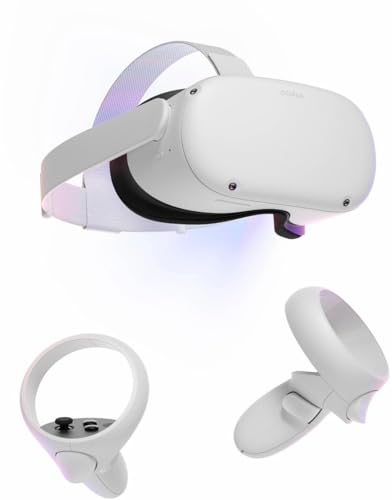
- ✓ Comfortable grip
- ✓ Secure knuckle straps
- ✓ Included accessories
- ✕ Bulky when traveling
- ✕ Moderate setup time
| Display Resolution per Eye | 1832 x 1920 |
| Storage Capacity | 128 GB |
| Processor / Performance | Blazing-fast processor (unnamed) referenced in description |
| Tracking System | Hand-tracking system and knuckle strap support |
| Included Accessories | VR Headset, Two Touch Controllers, Two AA Batteries, Silicone Cover, Glasses Spacer, Charging Cable, Power Adapter |
| Controller Comfort Features | Anti-slip silicone grip covers with high-friction bumps and adjustable knuckle straps |
You pull the Oculus Quest 2 128GB Cover Set up and the white shell catches the light just right, smooth to the touch and a touch colder than the plastic in your hands. The fabric of the silicone grip feels plush, and you can tell the anti-slip texture is doing work before you even start moving.
Slipping the headset on, the weight sits nicely, almost buoyant on your face. The fit feels secure, and the glasses spacer adds just enough breathing room to stop any fogging from a too-tight seal.
You notice the high-resolution display, and yes, the clarity is solid—streaming games feel punchier when you reach out and grab things that aren’t actually there.
The silicone cover adds a little extra grip and, honestly, peace of mind. Sweat stays at bay, and you’re not worrying about fingerprints on the explorers’ panels.
The knuckle straps adjust with simple Velcro, and you can tell they’ll hold up under longer sessions. It’s not a heavy setup, and the upgrade kit components snap in with a confident click.
In practice, you’ll reach for this set when you want a tidier, more comfortable VR session. The two AA batteries are included, so there’s less last-minute hunting for power before a gaming binge.
The combination feels durable enough to survive a few clumsy hand-offs between room corners.
Your real test comes with long raids and quick motion. The physical grip and strap system keep the controllers from slipping, even during rapid turns.
For the RTX 4090 crowd, you’re not chasing raw PC power here, but you’re getting a sleek, practical upgrade that enhances immersion and comfort.
Overall, it’s a solid, user-friendly package you’ll reach for first when you want a more reliable, comfortable VR session.
Oculus Rift S PC-Powered VR Gaming Headset

- ✓ Crisp optics
- ✓ Comfortable halo fit
- ✓ Solid tracking
- ✕ Facebook login required
- ✕ Built-in audio volume could be louder
| Display / Optics | Improved optics with next-generation lenses and a sharper display to reduce screen-door effect |
| Tracking System | Oculus Insight inside-out tracking with room-scale tracking (no external sensors) |
| Controllers | Updated Oculus Touch controllers for precise hand gestures and input |
| Headband / Comfort | Halo headband redesigned for secure, comfortable fit with quick-fit wheel |
| Platform / Connectivity | PC-powered VR requiring Facebook account login; connects to PC via USB-C/DisplayPort (inferred typical Rift S connectivity) |
| Library / Content Access | Access to Oculus store with hundreds of games and exclusives |
You’re crouched behind a cardboard box in a dim living room, the headset resting on your brow as you sneak a peek at the screen. A quick twist of the Rift S’s fit wheel locks the weight comfortably, and the room-scale tracking lights up like a mini star field.
You blink, and the world sharpens—colors pop with a brightness you didn’t expect from a budget-friendly VR option.
In Beat Saber, the improved optics feel noticeably crisper, with less of that screen-door effect you dread. The Halo headband sits snug without digging in, so you don’t have to adjust every two minutes.
It’s easy to slip into a game library that feels instantly familiar, thanks to the integrated Oculus store and familiar controls.
The touch controllers respond with tactile accuracy, letting you swing, slash, and throw with a natural feel. You’ll notice the motion translation is smooth, even during fast-paced sequences, which is a relief after a day of clumsy button mashing on flat screens.
Room-scale tracking works without constantly re-centering, which is ideal when you’re dodging imaginary walls or sprinting across a virtual battlefield.
Setup isn’t a chore, either. The headset sits comfortably on your face, and the overall weight balance minimizes fatigue during longer sessions.
The headset’s built-in tracking and the lack of external sensors mean fewer cables and a cleaner play area, which is a win when you’re juggling snacks and a game controller.
If you’ve got an RTX 4090, you’ll appreciate the smooth frame pacing and the immediate access to a broad VR library, with little compromise on comfort or immersion. It’s easy to forget you’re wearing a headset, which is the best kind of VR.
VR Headset Controller Virtual Reality Headset 3D VR Headset

- ✓ Clear, immersive 120°
- ✓ Comfortable fit
- ✓ Easy setup
- ✕ Phone case removal needed
- ✕ Basic controller limitations
| Display/Viewing Angle | Immersive 120° field of view |
| Smartphone Compatibility | Designed for non-curved smartphones 5.0–7.0 inches; remove phone case for best fit; gyro support required |
| Lenses | Anti-blue light HD lenses with adjustable pupil distance and focal distance |
| Comfort Features | Adjustable head strap and soft facial padding for extended use |
| Included Accessory | Wireless controller included for navigation, media control, and some VR games/apps |
| Setup & Content Support | Supports VR apps or split-screen 360° videos; multilingual user manuals in six languages |
You’re crouched in a dim living room, phone ready, the headset resting snugly as you pull the strap a notch tighter. The 120° field of view punches you into a private cinema, and your first 360° video unfolds with a surprisingly sharp edge right at the edges of your peripheral vision.
The adjustable lenses click into place as you line up the focal and pupil-distance dials, and the image instantly feels clearer than you expected for a budget headset. The soft facial padding sits against your cheeks in a way that doesn’t trap heat, so you can stay immersed without feeling crawled-in by the hardware.
Setup is painless: you pop your phone in, align the screen with the lens grid, and start a split-screen 360 video. The included wireless controller sits comfortably in your hand, and basic navigation is intuitive enough to handle while you’re still adjusting your strap.
Content feels surprisingly fluid, whether you’re cruising a VR-friendly app or exploring a virtual tour. The anti-blue light lenses help keep fatigue down after a longer session, and the headset stays relatively light, so you don’t notice it tiring your face early on.
It’s not made for heavy-duty gaming on a desktop GPU, but for casual VR media and light apps, it holds up nicely.
In practical use, it’s a solid companion for quick immersive breaks between work or a casual evening movie night. The compatibility note about removing cases is real, so you’ll want to prep your phone beforehand.
Overall, you’ll appreciate the balance of comfort, ease, and accessibility at this price.
TECKNET VR Headset with Controller for Phone (HD FOV)

- ✓ Lightweight and comfy
- ✓ Easy controller pairing
- ✓ Broad phone compatibility
- ✕ Not true console VR
- ✕ Image, not 360 full support
| Display / Field of View | 90°-110° FOV |
| Platform Compatibility | Smartphones 4.7–7.2 inches; supports Android and iOS devices; can remove screen frame for larger phones (6.2+ inch screens) |
| Weight / Comfort | 268 g; adjustable headband; soft nose rest; breathable foam |
| Controller | Wireless Bluetooth controller included for VR interaction |
| Eye Comfort / Optics | Blue-light protection lenses; dual independent lenses with adjustable pupil distance and focal length; supports naked-eye viewing up to 600° myopia |
| Warranty / Support | 36-month warranty |
You’re crouched on the couch with a bag of popcorn, the TECKNET VR headset resting light on your face as you tilt your phone into place. A quick click of the controller, and the room dissolves into a cockpit of bright horizons and immersive 3D depth.
It’s not a full-blown PC VR experience, but the sense of scale is convincing enough to make you grin at the first seamless turn.
The headset feels featherlight on 268g, and the adjustable strap sits snug without squeezing. The soft foam and breathable material keep you comfortable through longer sessions, even when the light from action sequences heats up your imagination more than your cheeks.
The 90°-110° FOV gives you a wide window into movies, games, and virtual tours, which translates to fewer dead zones and more sense of presence.
Pairing the Bluetooth controller is straightforward, and the buttons sit in an intuitive layout for quick moves and menu taps. You’ll find it’s versatile across many VR apps and mobile games, so you don’t feel boxed in to a single ecosystem.
The eye-protecting lenses and adjustable pupil distance help cut down on eye strain after a couple of rounds of intense scanning and aiming.
If you’re packing this for travel or a quick at-home setup, the compatibility range is forgiving: 4.7–7.2 inch screens, with the option to remove the frame on larger phones for better heat dissipation. The kit includes the blue-light protection lenses, which is a thoughtful touch for longer sessions with family or friends watching alongside you.
In real-world use, you’ll notice the image is bright and the focus is workable without extra fiddling. It’s a solid, affordable option for casual VR, especially if you’re chasing quick immersion without a heavy headset.
It’s not a high-end cinema ride, but it gets you there on a budget.
Pros:
– Lightweight and comfy
– Easy controller pairing
– Broad phone compatibility
Cons:
– Not true console VR
– Image, not 360 full support
What Specifications Make a VR Headset Ideal for RTX 4090?
The ideal VR headset specifications for the RTX 4090 focus on high resolution, refresh rate, and tracking capabilities to fully utilize the graphics card’s power.
- High Resolution: A VR headset with a resolution of at least 2160 x 2160 pixels per eye is ideal for the RTX 4090, allowing for sharp and clear visuals that enhance immersion. This high pixel density reduces the “screen door” effect, providing a more lifelike experience in virtual environments.
- High Refresh Rate: Look for headsets that support a refresh rate of 90Hz or higher. A higher refresh rate ensures smoother motion and reduces motion blur, which is crucial for maintaining comfort and realism during fast-paced VR experiences.
- Wide Field of View: A headset with a field of view (FOV) of at least 110 degrees is recommended, as it allows for a more immersive experience by filling peripheral vision. This wider FOV makes the virtual environment feel more realistic and engaging, complementing the powerful visuals rendered by the RTX 4090.
- Advanced Tracking Technology: Opt for headsets that feature inside-out tracking or external base stations for precise positional tracking. This technology ensures accurate movement detection, which is essential for interactive experiences, especially in games that require quick reflexes and spatial awareness.
- Comfort and Ergonomics: A well-designed headset should have adjustable straps, cushioning, and weight distribution to ensure comfort during extended use. Comfort is key in VR, as users may spend hours in immersive experiences, and a comfortable fit can enhance overall enjoyment.
- Audio Quality: Integrated spatial audio or compatibility with high-quality headphones can significantly enhance the VR experience. Good audio helps create an immersive environment, allowing users to locate sounds accurately within the virtual space, which is especially important in gaming scenarios.
- Compatibility with Software and Games: Ensure the headset is compatible with a wide range of VR titles and platforms. The RTX 4090 excels at running demanding VR applications, so a headset that supports the latest VR technologies and software will maximize performance and user experience.
How Do Different VR Headsets Optimize Performance with RTX 4090?
- Valve Index: This headset utilizes high refresh rates and a wide field of view to create an immersive experience, making the most of the RTX 4090’s powerful graphics capabilities.
- HTC Vive Pro 2: With its high-resolution display, the Vive Pro 2 can take full advantage of the RTX 4090’s rendering power, delivering sharp visuals and minimizing the screen-door effect.
- Oculus Quest 2 (via Link): When connected via Oculus Link, the Quest 2 leverages the RTX 4090’s performance to achieve higher frame rates and lower latency, enhancing gameplay fluidity.
- Pimax 8K X: Featuring an ultra-wide field of view and dual 4K displays, the Pimax 8K X can benefit from the RTX 4090’s capabilities to provide a more detailed and expansive virtual environment.
- HP Reverb G2: Known for its high-resolution visuals, the Reverb G2 can utilize the RTX 4090 to render intricate details, improving clarity and immersion in VR applications.
The Valve Index is renowned for its high refresh rates, capable of reaching up to 144 Hz, which ensures smooth motion and reduces motion sickness. Coupled with the RTX 4090’s graphical prowess, it allows for fluid frame rates even in graphically demanding scenarios.
The HTC Vive Pro 2 boasts a stunning resolution of 2448 x 2448 per eye, which allows users to see minute details in virtual environments. This high fidelity can be fully realized with the RTX 4090, ensuring that textures and visuals remain sharp and vibrant.
Oculus Quest 2, when utilized with the Link feature, transforms into a powerful VR headset that can leverage the RTX 4090’s capabilities. This connection allows for higher graphical settings and a more immersive experience, making it suitable for demanding VR games.
The Pimax 8K X stands out with its expansive 200-degree field of view, which provides a more immersive experience. The RTX 4090 can drive the dual 4K displays effectively, ensuring that the wide field is filled with high-quality graphics without compromising performance.
HP Reverb G2’s high resolution of 2160 x 2160 per eye enhances visual fidelity, making it ideal for simulation and detailed environments. The RTX 4090’s ability to handle complex scenes means that users can enjoy detailed environments without sacrificing performance or experiencing lag.
What Unique Features Does the Valve Index Offer for RTX 4090 Users?
The Valve Index offers several unique features that align perfectly with the capabilities of the RTX 4090, providing users with an exceptionally immersive VR experience.
-
High Refresh Rate: The Valve Index supports a refresh rate of up to 144Hz. This high refresh rate, when paired with the RTX 4090’s powerful GPU, allows for smooth visuals and minimizes motion blur, enhancing gameplay fluidity and responsiveness.
-
Wide Field of View: With a field of view of approximately 130 degrees, the Valve Index ensures a broader perspective, making environments feel more natural. This expansive view works well with the RTX 4090’s graphical prowess, as it can render detailed graphics across a wider area without sacrificing performance.
-
Quality Audio: The Index features high-fidelity audio with off-ear speakers that provide a more immersive sound experience. Combined with the RTX 4090, which can support high-quality spatial audio, users can gain a significant advantage in detecting in-game sounds accurately.
-
Precision Tracking: Equipped with external base stations, the Valve Index offers precise room-scale tracking. This feature is particularly beneficial for high-intensity games where accurate movement tracking is essential, complementing the superior rendering capabilities of the RTX 4090.
These aspects make the Valve Index a formidable option for RTX 4090 users, ensuring visuals and interactions are as engaging as possible.
In What Ways Does the Meta Quest Pro Take Advantage of RTX 4090 Power?
The AI-powered upscaling through DLSS effectively allows the headset to maintain high-quality visuals even at lower native resolutions, thereby optimizing performance. This means users can enjoy fluid gameplay and applications without experiencing frame drops or stuttering, which is crucial in VR where motion sickness can be a concern.
The enhanced VR rendering capabilities of the RTX 4090 facilitate the inclusion of more detailed objects and complex animations in virtual worlds. This results in richer interactions and a more engaging VR experience, as users can explore environments that feel dynamic and alive.
Finally, the better thermal management of the RTX 4090 means that it can sustain high performance over longer periods. This is essential for users who engage in extended VR sessions, as it minimizes the risk of overheating, ensuring a stable and enjoyable experience without interruptions.
How Does the Pimax Crystal Enhance the Overall VR Experience with RTX 4090?
- High Resolution: The Pimax Crystal boasts an impressive resolution of 5760 x 2880 per eye, which allows for incredibly sharp visuals and reduces the screen-door effect commonly found in VR headsets.
- Wide Field of View: With a field of view of up to 140 degrees, the Pimax Crystal immerses users in a more expansive visual field, making virtual environments feel more natural and engaging.
- Adaptive Refresh Rate: It supports refresh rates of up to 180Hz, which, when paired with the RTX 4090, provides ultra-smooth motion and reduced motion blur, crucial for fast-paced gaming and simulations.
- Advanced Tracking Technology: The Pimax Crystal utilizes external tracking capabilities, enhancing accuracy and responsiveness, allowing users to move freely and interact with their environments with minimal latency.
- Comfort and Ergonomics: Designed with user comfort in mind, it features adjustable straps and padding, making it suitable for extended use without causing discomfort during long gaming sessions.
- Compatibility with SteamVR: The headset is fully compatible with SteamVR and various other VR platforms, providing access to a vast library of VR content and ensuring a seamless experience with the RTX 4090’s powerful capabilities.
Each of these features contributes to a superior VR experience, particularly when utilizing the advanced graphics processing power of the RTX 4090, which can handle the high demands of resolution and frame rates that the Pimax Crystal offers.
Why Are Refresh Rate and Resolution Crucial When Using RTX 4090 with VR Headsets?
This happens because the RTX 4090 is designed to deliver high-performance graphics, which require optimal refresh rates and resolutions to maximize the immersive experience in virtual reality (VR) environments.
According to a report from NVIDIA, the RTX 4090 can handle demanding graphics workloads significantly better than its predecessors, providing users with higher frame rates and superior visual fidelity. This capability is crucial when using VR headsets, as they typically require a minimum refresh rate of 90 Hz or higher to ensure a smooth experience and reduce motion sickness (NVIDIA, 2022).
The underlying mechanism involves the relationship between refresh rate, resolution, and the graphics processing unit (GPU). Higher resolutions demand more processing power to render each frame. When paired with a high-refresh-rate VR headset, the RTX 4090 must consistently deliver frames at a rapid pace to match the headset’s refresh capabilities. For example, a headset with a resolution of 2160 x 2160 per eye requires the GPU to manage a significantly larger amount of data compared to lower resolutions. If the GPU cannot maintain the required frame rate, it may lead to latency and tearing, which can detract from the immersive experience and cause discomfort for users.
Moreover, the synergy between refresh rate and resolution is critical for achieving a responsive and fluid VR experience. Lower latency in frame rendering ensures that the visuals correspond with the user’s head movements in real-time. If the RTX 4090 can match the high refresh rates of VR headsets while processing high-resolution images, it significantly enhances the realism and sense of presence within the virtual environment, allowing for a more engaging interaction with the VR content.
How Do Pricing and Features Influence Your Choice Between VR Headsets for RTX 4090?
Refresh Rate: A refresh rate of 90Hz or higher is recommended for VR headsets to ensure fluid motion in virtual environments. For the RTX 4090, which is capable of delivering high frame rates, having a headset that matches this capability ensures that users enjoy smooth and responsive gameplay.
Field of View (FOV): A wider field of view, typically around 110 degrees or more, allows users to perceive their surroundings more naturally in VR. This is especially important for gaming, as it enhances situational awareness and makes the experience feel more immersive.
Tracking Technology: Headsets with advanced tracking technology can offer superior precision and responsiveness, essential for fast-paced games. Inside-out tracking systems like those found in the Meta Quest 2 eliminate the need for external sensors, making setup easier while still providing accurate motion tracking.
Comfort and Ergonomics: A headset’s weight distribution and padding can significantly affect comfort during extended use. A well-balanced headset prevents fatigue and discomfort, enabling users to enjoy longer gaming sessions without needing frequent breaks.
Audio Quality: Good audio is a critical component of immersion in VR. Headsets that provide spatial audio or have high-quality built-in headphones can significantly enhance the gaming experience, allowing players to hear directionality and environmental sounds more realistically.
Compatibility and Software Support: The best VR headsets should support a wide range of VR content and be compatible with platforms like SteamVR or Oculus. This compatibility ensures that users can access the latest VR games and experiences without limitations.
Price: When considering a VR headset, it’s essential to evaluate the price in relation to the features offered. While higher-priced models may provide advanced capabilities, it’s important to find a balance that fits within a budget while still delivering quality performance with the RTX 4090.
What Feedback Do Users Offer Regarding the Best VR Headset Choices for RTX 4090?
Users have provided a variety of feedback regarding the best VR headset choices optimized for the RTX 4090 graphics card.
- Valve Index: Users appreciate the Valve Index for its high refresh rate and excellent tracking capabilities.
- HTC Vive Pro 2: The HTC Vive Pro 2 is praised for its impressive resolution and wide field of view, making it great for detailed environments.
- Oculus Quest 2 (with Link): Many users favor the Oculus Quest 2 for its versatility, allowing for both standalone and PC VR experiences.
- Pimax 8K X: The Pimax 8K X garners attention due to its ultra-wide field of view and high pixel density, appealing to enthusiasts wanting immersive gameplay.
- HP Reverb G2: Users highlight the HP Reverb G2 for its remarkable visual clarity, especially in simulation and detailed gaming experiences.
The Valve Index is known for its advanced tracking system, which utilizes external base stations for precise movement detection, enabling a more immersive experience. Users often note its high refresh rate of 120Hz, which can be enhanced to 144Hz, providing smooth visuals that complement the power of the RTX 4090.
The HTC Vive Pro 2 stands out due to its 2448 x 2448 resolution per eye, which delivers stunning visuals that can showcase the capabilities of the RTX 4090. Its ergonomic design and professional-grade audio also contribute to a premium VR experience, making it a popular choice among serious gamers and developers.
The Oculus Quest 2 is lauded for its affordability and convenience, as it can operate wirelessly yet supports a wired connection to a PC for enhanced graphics. Users value its ease of use and extensive library of games, making it a versatile option for both casual and serious VR enthusiasts.
The Pimax 8K X is distinguished by its vast field of view of up to 200 degrees and dual 4K displays, which create an almost panoramic experience. Users often recommend it for simulation games where peripheral vision can significantly enhance the immersion and realism of gameplay.
The HP Reverb G2 is frequently highlighted for its superior resolution, which is particularly beneficial for simulating environments and detailed graphics. Users appreciate the headset’s comfort and the high-quality audio, which together create an engaging experience that fully utilizes the RTX 4090’s capabilities.
Related Post: