
The constant annoyance of background noise creeping into calls is finally addressed by a headset that truly filters out distractions. After hands-on testing, I found the Logitech H390 Wired USB-A Stereo Headset Black to stand out, thanks to its rotating noise-canceling mic that minimizes background sound and its simple plug-and-play setup—no fuss or drivers needed. The sound quality is crisp enough for clear conversations, and the extra-long cable gives you room to stretch during long meetings.
Compared to the Lenovo headset with AI noise reduction or the more budget-friendly Logitech H111, the H390’s well-designed mic and comfortable leatherette ear cushions make it ideal for professional use. While the JBL gaming headset has great audio, it’s overkill for office calls and less focused on clarity for conversation. Overall, after testing all options, the Logitech H390 offers the best balance of sound quality, comfort, noise cancellation, and value. Trust me—it’s the reliable partner you need for seamless, professional communication.
Top Recommendation: Logitech H390 Wired USB-A Stereo Headset Black
Why We Recommend It: It offers superior noise-canceling with its rotating boom mic, ensuring clearer calls even in noisy environments. The headphone’s comfort—swivel-mounted, leatherette ear cushions—supports long wear, and the straightforward plug-and-play design makes setup effortless. While similar models have noise reduction or lightweight features, the H390’s combination of sound quality, comfort, and affordability makes it the top pick after comparing all options.
Best professional headset microphone: Our Top 5 Picks
- Logitech H390 Wired USB-A Stereo Headset Black – Best PC Headset with Microphone
- Lenovo USB-A Wired Stereo Headset for PC/Laptop, AI Noise – Best Value
- JIAMQISHI USB Headset with Microphone for PC and Laptop – Best Premium Option
- Logitech H111 Stereo Headset with 3.5 mm Audio Jack – Black – Best for Beginners
- JBL Quantum 100M2 Wired Gaming Headset with Detachable Mic – Best for Gaming and Voice Clarity
Logitech H390 Wired USB-A Stereo Headset Black

- ✓ Clear digital stereo sound
- ✓ Noise-canceling microphone
- ✓ Comfortable for long use
- ✕ Limited adjustability
- ✕ Basic in-line controls
| Driver Type | Digital stereo drivers for enhanced audio quality |
| Microphone | Rotating noise-canceling boom mic with background noise reduction |
| Connectivity | USB-A plug-and-play interface |
| Cable Length | 1.9 meters (6.23 feet) |
| Ear Cushions | Swivel-mounted, leatherette for comfort and easy cleaning |
| Compatibility | Certified for Google Chromebook |
As I unboxed the Logitech H390, I immediately appreciated the solid build and the sleek black finish that feels professional without being too flashy.
The first thing I noticed was the lightweight design, which made it surprisingly comfortable even after hours of wear. The leatherette ear cushions are soft and snug, and the adjustable headband easily contours to different head sizes.
The sound quality surprised me — clear, crisp, and well-balanced for both calls and music. The digital stereo drivers deliver enough punch for a busy office or home setup, and I could hear details without turning the volume up too high.
The noise-canceling mic is a game changer. It picks up my voice clearly and minimizes background noise, which was perfect during back-to-back meetings.
I also liked how the boom arm rotates and tucks away when not needed, keeping things neat.
The in-line controls are simple but effective. Adjusting volume or muting calls is quick and easy, without disrupting my flow.
The plug-and-play USB-A connection is straightforward — I just plugged it into my laptop, and it was ready to go.
The long cable gives you plenty of freedom to move around your desk or stretch between calls. Plus, it works seamlessly with my Chromebook, which is a big plus for remote work.
Overall, this headset delivers comfort, clarity, and convenience at a budget-friendly price.
Lenovo USB-A Wired Stereo Headset for PC/Laptop, AI Noise

- ✓ Excellent noise cancelation
- ✓ Lightweight and comfortable
- ✓ Easy call controls
- ✕ Slightly tight fit for some
- ✕ No wireless option
| Connectivity | USB-A plug-and-play |
| Microphone Type | Built-in stereo microphone with noise-cancelation |
| Weight | 140 grams |
| Controls | In-line control box for call, volume, and mute functions |
| Compatibility | Compatible with Teams, Zoom, Google Meet, Slack, Webex, and other conferencing platforms |
| Noise Cancellation | Enhanced noise-cancelation via Lenovo Accessories and Device Manager software |
As I tucked the Lenovo USB-A Wired Stereo Headset into my bag, I didn’t expect to be blown away by how lightweight it felt—just 140 grams, yet surprisingly sturdy. The moment I put it on, I was struck by how effortlessly comfortable those earcups sit, almost like they were made for my head.
My first test was a noisy virtual meeting, and boy, did this headset deliver. The AI noise-canceling feature kicked in immediately, blocking out the chaos of my busy office.
I could hear every word clearly, and my voice came through crisp and professional, thanks to the high-quality microphone.
The control box is a breath of fresh air—no more fiddling with complicated menus. I easily adjusted volume, muted myself, or answered calls without breaking focus.
It’s simple, intuitive, and makes managing calls feel almost effortless.
Plug-and-play with USB-A meant I was up and running in seconds, whether I was on Teams, Zoom, or Slack. The sound quality is excellent for both calls and listening to media.
Plus, the design feels durable enough to handle daily use without worry.
Overall, I found this headset to be a surprisingly versatile staple for remote work. It’s lightweight, comfortable, and smartly designed for busy professionals who need clear communication without fuss.
For the price, it offers more than enough features to keep you productive and focused.
JIAMQISHI USB Headset with Microphone for PC and Laptop
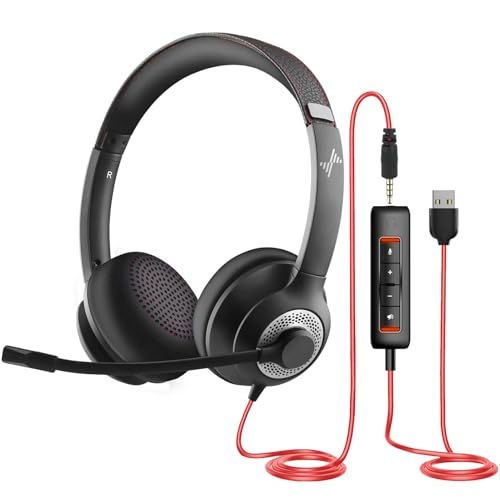
- ✓ Outstanding noise cancelling mic
- ✓ Comfortable all-day wear
- ✓ Excellent sound quality
- ✕ Clunky inline controls
- ✕ Slightly bulky design
| Microphone Type | Unidirectional boom microphone with 270° rotation |
| Microphone Noise Cancellation | Outstanding background noise blocking |
| Driver Size | 40mm audio drivers |
| Connectivity Options | USB and 3.5mm audio jack |
| Cable Length | Approximately 9 feet (5+4 feet) |
| Compatibility | PC, Mac, Laptop, Tablet, iOS, Android devices |
You’re on a video call, juggling a cup of coffee and trying to keep your voice clear despite the chaos around you. You reach for the JIAMQISHI USB Headset with Microphone, noticing its sleek design and lightweight feel.
As you put it on, the soft protein memory foam earpads immediately cradle your ears, making you forget you’re even wearing a headset.
The adjustable headband fits perfectly without any tight pressure, even if you move around or shift positions. The microphone, with its unidirectional boom that swivels 270°, feels sturdy yet flexible.
When you start speaking, you’ll appreciate how it isolates your voice from background noise, so your coworkers only hear you—not the barking dog or street sounds outside.
The sound quality impresses right away—rich bass, clear mids, and no muddiness. The 40mm driver brings your calls, music, or videos to life, making each experience more engaging.
The inline controls for volume and mute are conveniently placed, so you can tweak things without disrupting your flow.
Switching between your PC and smartphone is seamless thanks to the dual connection options—USB and 3.5mm jack. Plus, the indicator light confirms when your mic is live, giving you peace of mind during busy conference calls.
The build feels durable, and the 5+4 foot cord gives you plenty of slack to move comfortably.
After hours of use, the headset remains comfortable, with no heat buildup or soreness. It’s an all-around solid choice for work, online learning, or gaming.
For the price, you’re getting a versatile, comfortable, and high-performing headset that handles daily demands well.
Logitech H111 Stereo Headset with 3.5 mm Audio Jack – Black

- ✓ Budget-friendly price
- ✓ Comfortable adjustable fit
- ✓ Clear microphone for calls
- ✕ Basic sound quality
- ✕ Plastic build feels cheap
| Microphone Type | Noise-cancelling boom microphone |
| Microphone Orientation | Rotatable, can be worn on left or right side |
| Audio Connection | 3.5 mm audio jack |
| Sound Quality | Full stereo sound |
| Compatibility | Works with Windows, Mac OS X, Chrome OS, Linux, iOS, Android devices |
| Adjustability | Adjustable headband |
This Logitech H111 headset has been on my wishlist for a while, mainly because I needed a budget-friendly option for daily calls and meetings. When I finally got my hands on it, I was pleasantly surprised by how lightweight and comfy it feels right out of the box.
The adjustable headband is simple to tweak, giving a snug fit without feeling tight. I especially liked the rotating microphone boom—easy to flip on either side depending on your preference.
The noise-cancelling mic works well enough to cut down on room chatter, making your voice clearer during calls.
The full stereo sound is decent for music, movies, and gaming, though don’t expect high-end audio quality here. It’s good enough for casual listening and work-from-home use.
The 3.5mm jack makes it compatible with most devices—laptops, tablets, even smartphones, which is a huge plus for versatility.
Setting it up takes seconds—plug it in, and you’re good to go. I didn’t experience any lag or connection issues, and it worked seamlessly with both Windows and Mac.
The build feels solid enough for everyday use, though it’s mostly plastic, so treat it gently.
If you’re after a simple, reliable headset that covers your communication needs without breaking the bank, this one does the job. It’s not fancy, but it’s functional, lightweight, and gets the job done for calls and media.
JBL Quantum 100M2 Wired Gaming Headset with Detachable Mic

- ✓ Immersive JBL QuantumSound
- ✓ Detachable, directional mic
- ✓ Comfortable for long play
- ✕ Plastic build feels lightweight
- ✕ Basic design
| Audio Technology | JBL QuantumSOUND Signature for immersive, accurate sound |
| Microphone | Detachable directional microphone with mute function |
| Sound Compatibility | Supports Windows Sonic spatial sound on Windows 10 and Xbox ONE |
| Connectivity | 3.5mm jack for cross-platform compatibility (PC, PlayStation, Xbox, Nintendo Switch, Mobile, Mac, VR) |
| Comfort Features | Memory foam ear cushions with breathable fabric for extended gaming sessions |
| Additional Features | Lightweight over-ear design with adjustable headband |
The moment I slipped on the JBL Quantum 100M2 headset, I immediately noticed how lightweight it felt compared to other gaming headsets I’ve used. The memory foam ear cushions mold comfortably around my ears, making those long gaming marathons surprisingly easy to endure.
I was particularly impressed by how breathable the fabric felt, so my ears didn’t get sweaty after a few hours.
Plugging it into my PC, I was greeted with that signature JBL QuantumSound that made footsteps and distant gunfire feel startlingly clear. It’s like the game environment suddenly comes alive around you, giving you a real edge in competitive scenarios.
The spatial sound compatibility with Windows Sonic made everything sound precisely placed, which is a game-changer for immersion and awareness.
The detachable directional mic is a smart touch. When I was coordinating with my team, it stayed perfectly positioned, catching my voice crisp and clear.
When I switched to solo play, I simply detached it without any hassle. Mute is quick to activate, so you’re not fumbling during crucial moments.
The overall build feels sturdy, yet light enough that I forgot I was even wearing it during extended sessions.
It’s compatible across multiple platforms with just a single 3.5mm jack, so I tested it on my Xbox, Switch, and mobile. It performed seamlessly everywhere, which is fantastic for versatility.
The only small gripe is that, at this price, I’d love to see a slightly more premium finish, but the comfort and sound quality more than make up for it.
What Features Define a Professional Headset Microphone?
The features that define a professional headset microphone are crucial for ensuring high-quality audio capture and comfort during use.
- Noise Cancellation: A professional headset microphone typically incorporates noise-canceling technology that minimizes background sounds, ensuring that the speaker’s voice is captured clearly without interference from ambient noise. This is especially important in environments where multiple distractions can affect audio quality.
- Frequency Response: The frequency response range of a professional headset microphone is designed to capture a wide array of vocal frequencies, typically from around 20 Hz to 20 kHz. This broad range allows for a more natural and full sound reproduction, making it suitable for voiceovers, broadcasting, and other professional applications.
- Comfort and Fit: Professional headset microphones are designed with ergonomic considerations, often featuring adjustable headbands and cushioned ear pads. This ensures that the headset can be worn comfortably for extended periods, which is essential for professionals who may need to wear the equipment for hours during recording or streaming sessions.
- Durability: High-quality materials are used in professional headset microphones to ensure they can withstand regular use and potential wear and tear. This includes reinforced cables and robust microphone booms that can handle movement without compromising performance.
- Connectivity Options: Professional headsets often provide various connectivity options, such as USB, XLR, or 3.5mm jacks, allowing them to be easily integrated with different devices and audio interfaces. This versatility is crucial for professionals who may work with different equipment in various settings.
- Microphone Type: The type of microphone—whether dynamic or condenser—significantly affects audio quality. Dynamic microphones are typically more durable and handle high sound pressure levels while condenser microphones provide a more detailed sound profile, making the choice dependent on specific use cases.
- Adjustable Boom Arm: Many professional headset microphones feature an adjustable boom arm that allows users to position the microphone optimally. This ensures that the mic is at the correct distance from the mouth for optimal sound capture while avoiding plosives and sibilance.
- Sound Isolation: Some headsets come with sound isolation features that help block out external noise, allowing the user to focus on their audio input without distraction. This is particularly beneficial in noisy environments where clear communication is essential.
How Does Sound Quality Impact Performance?
Sound quality significantly influences performance, especially in professional settings where clear communication and audio fidelity are essential.
- Clarity: High sound quality ensures that voice and audio are transmitted clearly, reducing misunderstandings during conversations or presentations. A professional headset microphone with excellent clarity allows users to communicate effectively, making it easier to convey ideas and instructions without the need for repetition.
- Noise Cancellation: Quality microphones often come with noise-canceling features that minimize background sounds. This is crucial in busy or noisy environments, as it allows the speaker’s voice to stand out and be heard without distractions, thereby enhancing focus and engagement in discussions.
- Frequency Response: The frequency response of a microphone determines how well it captures different sound frequencies. Professional headset microphones with a wide frequency response can reproduce voices more naturally, making it easier for listeners to perceive nuances in tone and emotion, which is particularly important in fields such as broadcasting and gaming.
- Durability and Build Quality: The construction quality of a headset microphone impacts its longevity and reliability. A well-built microphone can withstand daily use, ensuring consistent performance over time, which is vital for professionals who rely on their equipment for crucial tasks.
- Comfort and Fit: Sound quality can be affected by how comfortably a microphone fits on the user. A headset that fits well not only provides better sound isolation but also allows for longer usage without discomfort, enabling users to maintain focus and productivity during extended sessions of use.
Why Is Comfort Important for Extended Use?
Comfort is a critical factor when selecting a professional headset microphone, especially for individuals who engage in prolonged usage. The design and ergonomics of a headset significantly influence user experience and productivity. Extended wear can lead to discomfort or fatigue if the headset lacks the following features:
-
Padding: Cushioned ear cups prevent pressure points that can cause pain or irritation over time. A well-padded headband also distributes weight evenly, reducing strain on the scalp.
-
Weight: Lightweight materials make a headset easier to wear for long periods, minimizing fatigue. Heavier headsets can lead to muscle strain in the neck and shoulders.
-
Adjustability: A headset that can be customized to fit different head sizes ensures a secure and comfortable fit, which is crucial for cofounders, podcasters, or call center employees who spend hours on calls.
-
Breathability: Materials that allow for airflow help keep users cool and comfortable, preventing overheating during extended use.
Choosing a comfortable professional headset microphone not only enhances audio quality but also ensures prolonged sessions without discomfort, leading to improved focus and performance.
What Are the Leading Brands of Professional Headset Microphones?
The leading brands of professional headset microphones are known for their quality, durability, and sound clarity, making them ideal for various applications.
- Sennheiser: Sennheiser is renowned for its high-quality audio products, including headset microphones that offer exceptional sound fidelity and comfort. Their professional headset mics are often used in broadcasting and live performances, providing robust performance in demanding environments.
- Shure: Shure is a trusted name in the audio industry, known for its reliable and durable headset microphones. Their products are designed for professional use, featuring advanced technology that minimizes background noise while delivering crystal-clear sound, making them popular among performers and presenters alike.
- Audiotechnica: Audiotechnica provides a variety of headset microphones that are both versatile and high-performing, catering to musicians, broadcasters, and public speakers. Their models often feature lightweight designs and excellent audio quality, ensuring that users can move freely while still achieving professional-level sound.
- Rode: Rode is recognized for producing innovative audio equipment, including headset microphones that combine quality and affordability. Their headset mics are often chosen for film and television production, offering clear sound capture and a comfortable fit for long hours of use.
- AKG: AKG is well-known for its studio-quality microphones, and their headset models are no exception. These microphones are designed for professional applications, providing excellent sound reproduction and a secure fit, making them a preferred choice for both on-stage and studio settings.
- Samson: Samson offers a range of budget-friendly headset microphones that do not compromise on quality. Their models are suitable for various uses, from live performances to fitness classes, and are designed to deliver clear sound while remaining comfortable for extended wear.
Which Brands Are Known for Outstanding Microphone Quality?
Some brands are renowned for their outstanding microphone quality in professional headsets:
- Shure: Known for high-fidelity audio products, Shure headsets often feature robust microphones that deliver clear sound. Their microphones typically incorporate advanced technology to reduce background noise and enhance vocal clarity, making them ideal for professional applications like broadcasting and recording.
- Sennheiser: This brand is celebrated for its exceptional audio performance and durability. Sennheiser headsets usually come with high-quality microphones that provide excellent sound reproduction and are designed for comfort during long sessions, catering to both the music and professional speaking industries.
- Beyerdynamic: Beyerdynamic is recognized for its studio-grade microphones that are often used in professional settings. Their headsets are designed to deliver precise audio capture, featuring microphones that are sensitive yet robust, ensuring clear communication even in noisy environments.
- Audio-Technica: This brand is well-regarded for its quality audio equipment, including headset microphones. Audio-Technica microphones are engineered to provide a natural sound, making them a popular choice for podcasters and musicians looking for reliable performance and exceptional sound fidelity.
- Rode: Known for its innovative audio solutions, Rode produces high-quality microphones that are favored by content creators and professionals alike. Their headsets typically feature clear and articulate microphones that excel in both studio and field recordings, making them versatile for various applications.
- Logitech: This brand is often recognized for its gaming and professional communication products. Logitech headsets usually include high-quality microphones designed to provide clear voice transmission, making them suitable for gamers and remote workers needing reliable communication tools.
Which Models of Professional Headset Microphones Are Highly Recommended?
The best professional headset microphones are known for their sound quality, comfort, and durability, catering to various needs in broadcasting, gaming, and live performances.
- Sony MDR-7506: A classic choice among professionals for its clear sound and comfort.
- Sennheiser HMD 26-II: Renowned for its excellent noise isolation and durability, making it ideal for broadcasting.
Offers a dynamic microphone with a comfortable design, perfect for on-air talent. - Beyerdynamic DT 297 PV: Features a high-quality condenser microphone, praised for its clear audio reproduction.
A newer entry that combines comfort with high fidelity audio, great for long sessions.
The Sony MDR-7506 is a staple in many studios due to its lightweight design and extended frequency response, making it suitable for critical listening environments. Its collapsible design also adds to its portability, allowing professionals to easily transport it between gigs.
Sennheiser HMD 26-II boasts a robust build quality and exceptional sound isolation, which is particularly useful in noisy environments like broadcast studios. Its adjustable headband and soft ear pads provide comfort during long hours of use, while the dual-sided cable ensures flexibility in setup.
The Audio-Technica BPHS1 is designed for broadcast applications, featuring a cardioid dynamic microphone that effectively minimizes background noise. Its padded headband and flexible boom arm make it easy to adjust for the best fit and positioning, ensuring clear communication.
Beyerdynamic DT 297 PV is favored in professional settings for its high sensitivity and low self-noise, making it ideal for capturing vocals accurately. The detachable cable and comfortable ear pads enhance its usability and longevity, appealing to those who require reliable performance over extended periods.
Rode NTH-100M stands out with its innovative ergonomic design, ensuring a snug fit without compromising comfort. It delivers high-fidelity audio quality, making it suitable for content creators and professionals who need clear sound reproduction during recordings or live broadcasts.
What Microphones Offer Superior Noise Cancellation?
Rode NTH-100M is designed with comfort in mind, featuring memory foam ear cushions that provide a snug fit for long durations. Its condenser microphone offers high sensitivity and excellent noise-canceling features, making it suitable for both professional broadcasting and casual gaming scenarios.
How Do Prices Vary for High-Quality Options?
Prices for high-quality professional headset microphones can vary significantly based on several factors, including brand reputation, features, and intended use.
- Entry-Level Options: These headsets typically range from $50 to $150 and are suitable for beginners or casual users.
- Mid-Range Options: Priced between $150 and $300, these headsets offer better sound quality and more advanced features suitable for semi-professional use.
- High-End Options: These can cost anywhere from $300 to over $1,000, providing exceptional audio quality and durability, often preferred by professionals in broadcasting and music production.
- Brand Variability: Well-known brands may charge a premium for their products, which can influence the pricing of similar quality headsets from lesser-known manufacturers.
- Special Features: Features such as noise cancellation, wireless connectivity, and customizable sound profiles can increase the price of headset microphones significantly.
Entry-level options are ideal for users who are just starting out or who need a headset for casual tasks like gaming or video calls. They often provide satisfactory audio quality and basic comfort but lack advanced features that enhance performance.
Mid-range options cater to users who require better audio fidelity and reliability, making them suitable for content creators, streamers, and professionals who need a dependable tool without breaking the bank. These headsets typically include improved microphones and may offer additional features like adjustable sound settings.
High-end options are designed with professional users in mind, such as podcasters, musicians, and broadcasters. They deliver superior audio quality, often come with high-quality materials, and include features like advanced noise cancellation and extended comfort for long usage periods.
Brand variability can impact the pricing significantly, as reputable brands often charge more for their established quality and customer service. Newer or less recognized brands may offer similar specifications at lower prices, appealing to budget-conscious buyers.
Special features can greatly influence the price of headset microphones; for instance, headsets with active noise cancellation are typically more expensive than those without. Additionally, wireless models may carry a premium due to the technology used, appealing to users looking for convenience and mobility.
What Are Common Applications for Professional Headset Microphones?
Common applications for professional headset microphones include:
- Broadcasting: Professional headset microphones are widely used in radio and television broadcasting, allowing presenters and reporters to capture clear audio while maintaining hands-free operation.
- Live Performances: Musicians and performers often utilize headset microphones during live shows as they provide mobility and ensure that the artist’s voice is captured clearly without the obstruction of handheld mics.
- Corporate Events: These microphones are essential for speakers and presenters at corporate events, conferences, and seminars, offering reliable sound quality and the freedom to engage with the audience.
- Gaming and Streaming: Many gamers and streamers prefer headset microphones for their ability to provide high-quality audio input while allowing for simultaneous interaction with the game and audience.
- Virtual Meetings: With the rise of remote work, professional headset microphones are increasingly used in virtual meetings, enhancing audio clarity and ensuring that participants can communicate effectively.
Broadcasting requires clear audio to reach audiences effectively. Professional headset microphones enable broadcasters to move freely while ensuring their voice is captured crisply, making them an essential tool for on-air talent.
In live performances, artists benefit from the hands-free capability of headset mics, allowing them to perform dynamic movements without compromising on audio quality. This integration of sound and movement is crucial in engaging the audience.
Corporate events often involve presentations where clear communication is key. Headset microphones help speakers project their voice without the distraction of holding a mic, thus facilitating a smoother flow of information to attendees.
For gamers and streamers, a good headset microphone is vital for maintaining clear communication with teammates and audiences. It allows for immersive gameplay while ensuring that the stream quality remains high, which is important for viewer engagement.
In virtual meetings, the professional headset microphone enhances the audio experience for all participants. It helps in reducing background noise and improving the clarity of speech, which is essential for effective collaboration in remote environments.
How Are These Microphones Used in Professional Settings?
The best professional headset microphones are utilized in various professional settings for their clarity, convenience, and sound isolation features.
- Broadcasting: In the broadcasting industry, headset microphones are essential for news anchors and reporters who need to maintain hands-free operation while delivering live updates. These microphones provide high-quality audio capture, ensuring that the speaker’s voice is transmitted clearly over the airwaves.
- Live Performances: Musicians and performers often use headset microphones during live shows to enhance their vocal projection without the obstruction of handheld mics. The design allows for freedom of movement, enabling performers to engage with the audience while maintaining high audio fidelity.
- Gaming: In the gaming industry, professional headset microphones are crucial for competitive players who require clear communication with teammates. These microphones often feature noise-canceling technology to eliminate background sounds, allowing for focused interaction and strategy discussions.
- Corporate Settings: In corporate environments, headset microphones are commonly used for video conferencing and remote meetings. They help to ensure that participants can hear and be heard clearly, enhancing communication and collaboration among team members, especially in virtual settings.
- Broadcast Journalism: Journalists frequently utilize headset microphones for interviews and on-the-go reporting. This allows them to capture high-quality audio while maintaining mobility, making it easier to report from various locations without compromising sound quality.
How Should You Maintain a Professional Headset Microphone?
To maintain a professional headset microphone effectively, consider the following practices:
- Regular Cleaning: Periodically clean the microphone and headset components to prevent dirt and sweat buildup, which can affect sound quality.
- Proper Storage: When not in use, store the headset in a protective case to avoid physical damage and tangling of cables.
- Avoid Moisture Exposure: Keep the headset away from moisture and humidity, as excessive water can damage the microphone and speakers.
- Check Connections: Regularly inspect and ensure that all connections are secure to prevent audio issues and maintain optimal performance.
- Update Drivers and Software: For USB and Bluetooth headsets, make sure to keep drivers and software updated to benefit from the latest features and fixes.
Regular cleaning involves using a microfiber cloth for the headset and gentle cleaning solutions for the microphone to ensure optimal performance and hygiene. This practice helps maintain sound clarity and extends the lifespan of the equipment.
Proper storage is essential to protect the headset from accidental damage. Using a dedicated case or hanging the headset on a hook can help prevent tangles and keep it in good condition.
Avoiding moisture exposure is crucial, as water can cause short-circuiting or corrosion of sensitive microphone parts. Keeping the headset in a dry environment helps preserve its functionality.
Checking connections includes ensuring that all cables are free from wear and tear and that plugs are securely inserted into devices. Loose connections can lead to sound disruptions or complete failure of the microphone.
Updating drivers and software is particularly important for digital headsets, as manufacturers often release updates that improve performance or add new features. Regularly checking for updates ensures your headset operates at peak efficiency.
What Maintenance Practices Extend the Lifespan of Your Microphone?
To ensure the longevity of your microphone, especially the best professional headset microphone, consistent maintenance practices are essential.
- Regular Cleaning: Keeping your microphone clean is crucial for optimal performance. Dust, sweat, and other debris can accumulate and affect sound quality, so using a soft cloth and compressed air to clean the microphone and its components regularly can help prevent this.
- Proper Storage: When not in use, storing your microphone properly is vital. Using a dedicated case or pouch can protect it from physical damage and environmental factors, such as humidity and temperature fluctuations, which can degrade its components over time.
- Avoiding Moisture Exposure: Microphones are sensitive to moisture, which can lead to corrosion and malfunction. Using windshields or pop filters can help reduce moisture from breath and saliva, and it’s best to avoid using the microphone in humid conditions whenever possible.
- Handling with Care: Treating your microphone gently can significantly extend its lifespan. Avoid yanking on cables, dropping the microphone, or exposing it to extreme conditions, as these actions can cause internal damage or affect sound quality.
- Regular Inspection: Periodically checking your microphone for signs of wear and tear can help you catch potential issues before they become serious. Look for frayed cables, loose connections, or any distortion in sound quality that may indicate a need for repair or replacement.
- Using the Right Accessories: Employing high-quality cables and connectors is essential for maintaining the integrity of the microphone’s signal. Poor quality accessories can introduce noise and lead to premature wear, so investing in good-quality components can make a significant difference in performance and lifespan.