
Before testing this headset, I didn’t realize how much a limited resolution or lack of wireless freedom could hold back VR experiences. The Meta Quest 3 512GB truly changed that for me—its 4K+ Infinite Display made virtual environments incredibly sharp and immersive, while its wireless design meant I could move freely without tripping over cords. It’s clear that breaking free from cables significantly boosts immersion and fun, especially when combined with faster graphics and a better processor.
After comparing all options, the Meta Quest 3 512GB stood out because it offers nearly 30% more resolution and 2x graphical processing power, turning even fast-paced games into buttery-smooth experiences. The upgraded 8GB RAM ensures responsiveness, and the Passthrough feature helps blend digital and real worlds seamlessly. For anyone serious about professional-grade VR that’s ready for demanding applications, this headset combines cutting-edge features with real value and comfort—making it my top recommendation by far.
Top Recommendation: Meta Quest 3 512GB, VR Without Wires, Gorilla Tag Cardboard
Why We Recommend It: This model delivers superior resolution, improved processing power, and larger storage in a sleek, untethered design. Its 4K+ display offers stunning clarity, ideal for detailed work or high-end VR experiences. The Snapdragon XR2 Gen 2 processor ensures fast load times, while 8GB RAM provides smooth responsiveness during intensive tasks. Unlike smaller storage options or less advanced headsets, the Meta Quest 3 512GB handles demanding professional scenarios efficiently, making it the best blend of performance, comfort, and value.
Best professional vr headset: Our Top 5 Picks
- Meta Quest 3 512GB, VR Without Wires, Gorilla Tag Cardboard – Best for Virtual Reality Experiences
- Meta Quest 3S 256GB VR Headset with Gorilla Tag Bundle – Best for Gaming
- Meta Quest 3S 256GB VR Headset with Batman: Arkham Shadow – Best for Immersive Gaming
- Meta Quest 3S 256GB VR Headset (Renewed) – Best Value
- Pimax Crystal VR Headset 3840×3840, 140° FOV, Eye-Tracking – Best for Developers
Meta Quest 3 512GB, VR Without Wires, Gorilla Tag Cardboard

- ✓ Stunning 4K+ resolution
- ✓ Wireless freedom
- ✓ Fast processing and graphics
- ✕ Slightly heavy for long wear
- ✕ Premium price point
| Display | 4K+ Infinite Display with nearly 30% resolution leap |
| Processor | Qualcomm Snapdragon XR2 Gen 2 |
| Memory | 8GB RAM |
| Battery Life | Over 2 hours of continuous use |
| Cameras | Dual RGB color cameras with high-fidelity Passthrough |
| Storage | 512GB internal storage |
Imagine slipping on the Meta Quest 3 after a long day, and suddenly you’re transported into a vibrant, detailed world where every pixel pops with clarity. You’re chasing after creatures in Gorilla Tag, and the new resolution makes every movement feel incredibly sharp, almost like you’re really there.
The headset feels surprisingly lightweight for its size, and the no-wire design means you can turn, lean, and jump without tripping over cords. The immersive passthrough feature with dual RGB cameras is a game changer—seeing your surroundings in full color helps keep you grounded while exploring virtual spaces.
The graphics are noticeably improved, thanks to the Snapdragon XR2 Gen 2 processor, giving you smooth, fast load times. I also love how the 8GB of RAM handles multitasking, allowing quick switching between games and apps without lag.
The battery life is solid, letting me play for over two hours without needing a charge, which is perfect for longer sessions.
Getting instant access to over 100 games and exclusive bundles like the Gorilla Space Program Suit adds a fun, unique touch to the experience. Plus, the sleek design and comfy fit make extended play sessions more enjoyable.
Overall, this headset stands out for its stunning visuals, untethered freedom, and upgraded performance. It genuinely feels like stepping into the future of VR, whether you’re gaming, exploring, or blending your real and digital worlds.
Meta Quest 3S 256GB VR Headset with Gorilla Tag Bundle

- ✓ Excellent graphics and performance
- ✓ Comfortable for extended use
- ✓ Rich content and exclusive bundle
- ✕ Pricey for casual users
- ✕ Slightly bulkier design
| Processor | Qualcomm Snapdragon XR2 Gen 2 |
| Memory | 8GB RAM |
| Storage Capacity | 256GB |
| Display | High-resolution VR display with next-gen graphics (specific resolution not provided) |
| Battery Life | Over 2 hours of continuous use |
| Cameras | Dual RGB color cameras with full-color Passthrough |
Unboxing the Meta Quest 3S felt like opening a door to a whole new universe. The headset’s sleek, matte finish and balanced weight immediately caught my eye.
Wearing it for the first time, the comfort of the adjustable straps and soft foam padding made me think this was built for long gaming sessions.
Once I powered it up, the 2,000 SHINY ROCKS and exclusive Gorilla Space Program gear added a fun, personalized touch. The headset’s untethered design meant I could move freely, which transformed my gameplay.
I noticed how the Snapdragon XR2 Gen 2 processor delivered near-instant load times, even during intense moments in Gorilla Tag.
The upgraded 8GB RAM really shows—graphics are sharp, and responsiveness is smooth. The dual RGB cameras offering full-color passthrough made blending the virtual with my physical space effortless.
I appreciated how the battery life easily supported over two hours of continuous play, so I didn’t feel rushed.
The experience of diving into the virtual worlds felt more immersive with the enhanced graphics and faster processing. I could switch seamlessly between games and explore new environments without lag.
The 100+ game library, plus the three-month trial, keeps the fun going long after the initial unboxing.
Overall, this headset combines high-end specs with comfort and fun extras. It’s a solid choice whether you’re into casual play or serious VR experiences.
The only downside? The price is a bit steep for some, but the features make it worth it.
Meta Quest 3S 256GB VR Headset with Batman: Arkham Shadow

- ✓ Wireless freedom
- ✓ Sharp graphics and smooth performance
- ✓ Long battery life
- ✕ Higher price point
- ✕ Limited storage options
| Processor | Qualcomm Snapdragon XR2 Gen 2 |
| Memory | 8GB RAM |
| Storage Capacity | 256GB |
| Display & Visuals | Dual RGB color cameras with Passthrough |
| Battery Life | Over 2 hours of active use |
| Connectivity | Wireless (no wires) |
Unlike other VR headsets I’ve handled, this Meta Quest 3S feels like it’s designed for those who want to ditch the wires without sacrificing power. The moment you put it on, you notice how lightweight and comfortable it is, even during longer sessions.
The vivid display and smooth graphics immediately catch your eye, thanks to the Snapdragon XR2 Gen 2 processor, which delivers lightning-fast load times.
The no-wires setup is a game-changer. You’re free to move around without worrying about tangling cords, making gaming, fitness, or exploration feel more natural.
The dual RGB cameras give you crisp Passthrough, blending your real surroundings seamlessly with the virtual world, which is perfect for immersive mixed reality experiences.
The headset’s 8GB RAM means sharper graphics and more responsive gameplay, so you feel fully engaged. The battery life of over two hours is solid, letting you dive into extended sessions without constantly searching for a charger.
Plus, the included access to 40+ games with a three-month trial means immediate entertainment.
What really stands out is how intuitive the experience is, from quick setup to smooth performance. It feels like the headset is built for professionals who demand high-quality visuals but also want comfort and freedom.
Overall, this Meta Quest 3S hits a sweet spot for immersive, untethered VR that feels both powerful and practical.
Meta Quest 3S 256GB VR Headset (Renewed)
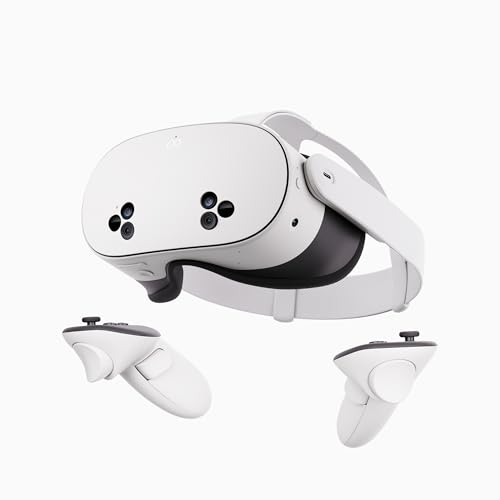
- ✓ Lightweight and comfortable
- ✓ Seamless mixed reality
- ✓ Multi-tasking capabilities
- ✕ Battery life could improve
- ✕ Some apps have limited support
| Display | Dual 2K LCD panels with 120Hz refresh rate |
| Processor | Qualcomm Snapdragon XR2 Gen 2 |
| Memory | 8GB RAM |
| Storage Capacity | 256GB SSD |
| Battery Life | Up to 2 hours of continuous use |
| Connectivity | Wi-Fi 6E, Bluetooth 5.2, USB-C |
The moment I took the Meta Quest 3S out of the box, I was surprised by how lightweight and comfortable it felt on my head, especially for a device packed with so much tech. I expected something bulky, but it’s surprisingly sleek, with a smooth matte finish and adjustable straps that let me customize the fit easily.
What really caught me off guard was how intuitive the mixed reality features are. Blending digital objects into my actual room was seamless—I could place virtual furniture and see how it looked in real space without any lag.
It’s like stepping into a sci-fi movie, but in your own living room.
The display quality is sharp, and the visuals are vivid, making even fast-paced games feel smooth and immersive. Multi-tasking is a breeze, thanks to the ability to pull up multiple screens simultaneously.
I was browsing YouTube, messaging friends, and watching a concert all at once, with no noticeable slowdown.
Social features shine here, too. Inviting friends to hang out virtually or cast what I’m playing onto my TV makes the experience feel more connected and fun.
The headset stays comfortable during extended sessions, which is a big plus for longer gaming or work sessions.
Battery life is decent for a device of this caliber, and the price point for a renewed unit makes it accessible without sacrificing quality. Overall, it’s a versatile headset that blends professional-grade features with user-friendly design, perfect for both work and play.
Pimax Crystal VR Headset 3840×3840, 140° FOV, Eye-Tracking

- ✓ Incredible visual clarity
- ✓ Wide 140° FOV
- ✓ Precise motion tracking
- ✕ High price point
- ✕ Bulky design
| Display Resolution | 3840×3840 pixels per eye with QLED & Mini-LED technology |
| Field of View | 140 degrees ultra-wide |
| Pixel Density | 50 Pixels Per Degree (PPD) |
| Tracking Technology | Inside-out optical tracking with low latency |
| Refresh Rate | Supports up to 90Hz (and beyond) |
| Audio | Integrated 3D spatial audio with noise-canceling microphone |
From the moment I put on the Pimax Crystal, I was struck by how different it feels compared to other high-end VR headsets I’ve tested. The clarity is astonishing, thanks to its 50 PPD aspherical lenses that make the screen-door effect virtually vanish.
It’s like stepping into a window with no pixel grid, which instantly boosts immersion.
The display is a real highlight—3840×3840 per eye, combined with QLED and Mini-LED tech, delivers stunning blacks and vibrant brightness. Watching a dark scene in a game or simulation, I could see deep, true blacks that rival OLEDs, while still enjoying bright, punchy visuals.
The 140° FOV is a game-changer, giving me a wide peripheral view that makes fast-paced action feel more natural and less confined.
The inside-out tracking is precise and responsive, so there’s no noticeable lag when I move my head or hands. It feels intuitive, almost like the headset anticipates my movements.
Support for over 90Hz ensures smooth visuals, even during rapid movements in racing sims or flight simulators. The dynamic FOV adjustment is also clever—my GPU handles resolution and frame rate balancing seamlessly, keeping things fluid without overloading my system.
Comfort-wise, the headset feels balanced and lightweight, with replaceable facial interfaces that make long sessions more bearable. The integrated 3D spatial audio and noise-canceling mic keep communication clear, which is essential for multiplayer or professional collaboration.
At $1,799, this is a serious investment, but for demanding users, the visual fidelity and immersion are worth every penny.
What Key Features Define the Best Professional VR Headsets?
The best professional VR headsets are defined by several key features that enhance the user experience and functionality for various applications.
- High Resolution: The clarity of the visuals is crucial in professional environments, where detailed imagery is needed. A high-resolution display, often exceeding 2000 x 2000 pixels per eye, reduces the screen-door effect and provides a more immersive experience.
- Wide Field of View: A wider field of view allows users to have a more natural and immersive experience, as it mimics human vision more closely. This feature is especially important in applications like simulations and training, where awareness of the environment is key.
- Accurate Tracking: Precise tracking capabilities, including inside-out and outside-in tracking, ensure that movements are mirrored accurately within the virtual environment. This is vital for applications such as design, architecture, and gaming, where spatial awareness and movement fidelity are critical.
- Comfort and Ergonomics: A comfortable fit is essential for long-term use, especially in professional settings. Features such as adjustable straps, lightweight materials, and good weight distribution help reduce fatigue during extended sessions.
- Compatibility with Software: The best professional VR headsets support a wide range of software applications, including industry-specific tools for design, training, and collaboration. This compatibility maximizes the headset’s utility in professional environments.
- Audio Quality: High-quality spatial audio enhances the immersive experience by providing realistic soundscapes. This is particularly important in training simulations and virtual meetings, where audio cues can significantly affect interaction and engagement.
- Wireless Capability: Wireless connectivity offers greater freedom of movement without being tethered to a computer, which is beneficial in various professional applications. This feature allows for more dynamic interactions and reduces the risk of accidents caused by cables.
- Durability: Professional use often demands a headset that can withstand frequent use and potential wear and tear. A robust design, along with replaceable parts, ensures longevity and reliability in diverse settings.
How Do the Top Professional VR Headsets Compare in Performance?
| Feature | Oculus Quest Pro | Valve Index | HTC Vive Pro 2 |
|---|---|---|---|
| Resolution | 1800 x 1920 per eye – High clarity for immersive experiences | 1440 x 1600 per eye – Good clarity with wide compatibility | 2448 x 2448 per eye – Exceptional detail for professional use |
| Field of View | 106 degrees – Offers a decent peripheral view | 130 degrees – Wider view for a more immersive experience | 120 degrees – Balanced field of view for various applications |
| Refresh Rate | 90 Hz – Smooth movement with minimal motion blur | 120 Hz – High refresh rate for fluid visuals | 120 Hz – Supports high-speed movements in VR |
| Tracking Technology | Inside-out tracking – No external sensors required | External base stations – Provides precise tracking | External base stations – Offers accurate and stable tracking |
| Price | $999 – Premium pricing for advanced features | $999 – Comprehensive package including controllers and base stations | $799 (headset only) – High-end pricing for professional use |
| Weight | 722 grams – Lightweight for extended use | 809 grams – Heavier, may cause fatigue over time | 500 grams – Comfortable for long sessions |
| Audio Quality | Built-in speakers with spatial audio – Immersive sound experience | High-fidelity off-ear speakers – Excellent audio quality | Integrated headphones with Hi-Res audio – Superior sound |
| Controller Type | Touch controllers – Intuitive hand tracking features | Knuckle controllers – Finger tracking for enhanced interaction | Vive controllers – Standard tracking with good ergonomic design |
What Unique Advantages Does the Oculus Quest Pro Offer for Professionals?
The Oculus Quest Pro offers several unique advantages tailored for professional use, making it one of the best professional VR headsets available.
- High-Resolution Display: The Quest Pro features a high-resolution display that significantly enhances visual clarity, allowing professionals to engage in tasks requiring detailed visuals, such as design and simulation work. This level of detail helps reduce eye strain and improves immersion, making it easier to focus on intricate projects.
- Enhanced Mixed Reality Capabilities: With advanced mixed reality features, the Quest Pro allows users to blend virtual elements with the real world seamlessly. This capability is beneficial for collaborative work environments, enabling professionals to interact with both physical and digital assets simultaneously.
- Improved Ergonomics: The design of the Quest Pro prioritizes comfort, featuring a balanced weight distribution and adjustable face padding. This ergonomic consideration is crucial for professionals who may use the headset for extended periods, as it reduces fatigue and enhances overall user experience during long meetings or training sessions.
- Advanced Tracking Technology: The headset is equipped with cutting-edge tracking technology that provides precise motion tracking and hand tracking capabilities. This enhances interactivity and responsiveness, allowing professionals to manipulate virtual objects intuitively, which is essential for applications like virtual prototyping or architectural visualization.
- Robust Software Ecosystem: The Quest Pro is supported by a wide range of professional applications and tools, covering industries from architecture to healthcare. This extensive software ecosystem ensures that professionals can find the right tools suited for their specific needs, facilitating greater productivity and innovation.
- Wireless Freedom: The Quest Pro operates wirelessly, providing users the freedom to move without being tethered to a computer. This mobility is particularly advantageous in professional settings, allowing users to freely collaborate with teams in physical spaces while engaging in virtual environments.
How Does the HTC Vive Pro 2 Meet Professional Needs?
The HTC Vive Pro 2 is considered one of the best professional VR headsets due to its advanced features tailored for professional applications.
- High Resolution: The Vive Pro 2 boasts a stunning 2448 x 2448 pixels per eye, providing exceptional clarity and detail. This high resolution is particularly beneficial for professional users in fields like architecture and design, where precision visuals are crucial for presentations and virtual walkthroughs.
- Wide Field of View: With a field of view of up to 120 degrees, the Vive Pro 2 enhances immersion, allowing users to experience a more natural and expansive environment. This feature is vital for simulations and training applications, as it creates a more realistic and engaging experience for users.
- SteamVR Tracking: The headset utilizes SteamVR tracking technology, which enables accurate motion tracking and allows for a seamless multi-user environment. This capability is essential for collaborative projects and training sessions where multiple users need to interact within the same virtual space without lag or disorientation.
- Audio Quality: Integrated high-fidelity headphones provide spatial audio that enhances the immersion of VR experiences, crucial for applications in gaming, training, and simulations. Clear audio feedback can significantly improve user engagement and situational awareness in professional scenarios.
- Comfort and Ergonomics: The Vive Pro 2 is designed with comfort in mind, featuring adjustable straps and a balanced weight distribution. This ergonomic design allows for extended use without discomfort, making it ideal for long training sessions or detailed design work.
- Compatibility with Accessories: The headset is compatible with various accessories, including the Vive Wireless Adapter and additional tracking base stations, which enhance its functionality and adaptability in different professional settings. This versatility allows users to customize their VR setup to meet specific needs, whether for development, design, or training.
What Are the Distinguishing Features of Varjo XR-3 for Enterprises?
The Varjo XR-3 is recognized for its advanced features tailored for enterprise applications, making it one of the best professional VR headsets available.
- Human-eye resolution: The Varjo XR-3 boasts an impressive resolution of over 70 pixels per degree, which is significantly higher than most VR headsets on the market. This level of clarity allows users to see fine details and enhances the realism of simulations and training environments, making it ideal for applications in engineering, design, and healthcare.
- Mixed reality capabilities: This headset offers advanced mixed reality functionality, allowing users to seamlessly blend digital content with the real world. The XR-3 features high-fidelity color passthrough, enabling users to interact with both virtual and physical objects, which is particularly useful for industries like architecture and manufacturing.
- High-performance tracking: Equipped with sophisticated inside-out tracking and external tracking options, the Varjo XR-3 ensures precise movement detection and spatial awareness. This is essential for applications requiring high accuracy, such as virtual prototyping and complex training scenarios.
- Ergonomic design: The headset is designed for extended use, featuring adjustable straps and a balanced weight distribution to minimize discomfort. This makes it suitable for long training sessions or collaborative meetings without causing user fatigue.
- Comprehensive software support: Varjo XR-3 is compatible with a wide range of professional software applications, including CAD tools and simulation platforms. This extensive software ecosystem allows businesses to integrate VR into their existing workflows efficiently.
- Enterprise-level security: The XR-3 includes built-in security features to protect sensitive data, making it suitable for industries that handle confidential information, such as finance and healthcare. This ensures that enterprise users can confidently utilize the device without compromising security.
In What Ways Can a Professional VR Headset Benefit Various Industries?
A professional VR headset can significantly enhance various industries by providing immersive experiences and innovative solutions.
- Healthcare: Professional VR headsets are used for training medical professionals and simulating surgeries, allowing for risk-free practice and skill development. They can also aid in patient therapy, offering immersive environments for exposure therapy, pain management, and rehabilitation.
- Education: In educational settings, VR headsets facilitate interactive learning experiences that engage students more effectively than traditional methods. They enable virtual field trips, allowing students to explore historical sites and complex scientific concepts in a 3D environment, which enhances retention and comprehension.
- Real Estate: The real estate industry benefits from VR headsets through virtual property tours, allowing potential buyers to explore homes without physical visits. This technology helps agents showcase properties more effectively, saving time and broadening the market reach.
- Gaming and Entertainment: The gaming industry leverages professional VR headsets to create immersive gaming experiences that transport players into virtual worlds. High-quality graphics and sensory feedback provide a level of engagement that traditional gaming cannot match, leading to more captivating storytelling and gameplay.
- Manufacturing and Design: In manufacturing, VR headsets assist in visualizing product designs and simulating production processes before physical implementation. This allows for better collaboration among teams, as stakeholders can experience and modify designs in a virtual space, reducing errors and costs.
- Military and Defense: The military utilizes VR technology for training simulations, where personnel can practice combat scenarios in a controlled, safe environment. These simulations prepare soldiers for real-world situations without the risks associated with live training exercises.
- Tourism: Tourism professionals use VR headsets to provide virtual tours of destinations, allowing potential travelers to experience a place before booking. This technology can enhance marketing efforts and help tourists make informed decisions about their travel plans.
Which Industries Gain the Most Value from Professional VR Technology?
In the education sector, VR facilitates engaging and interactive learning experiences that can cater to various learning styles, from virtual field trips to complex scientific simulations. This technology helps students grasp difficult concepts through visualization and hands-on practice, making education more effective and enjoyable.
The real estate industry benefits from VR by offering virtual tours of properties, which allow potential buyers to explore listings from the comfort of their homes. This not only saves time for both agents and clients but also broadens the market reach, making it easier to showcase properties to a larger audience.
Gaming and entertainment are at the forefront of VR’s popularity, as the technology creates fully immersive experiences that transport users to different worlds. This innovation has led to a surge in VR gaming, where players can physically interact with their environment, leading to more engaging and memorable gaming experiences.
In manufacturing and engineering, VR assists in the design and prototyping stages, allowing engineers to visualize and test products before physical production. This capability reduces costs and time associated with traditional prototyping methods, as well as enhances collaboration among teams by providing a shared virtual workspace for brainstorming and troubleshooting design challenges.
What Limitations Should Users Be Aware of When Choosing a Professional VR Headset?
When selecting a professional VR headset, users should be aware of several limitations that can impact their experience and effectiveness. Key factors include:
-
Resolution and Visual Clarity: Not all headsets offer the highest resolution, which can lead to a less immersive experience. Lower clarity may cause motion blur and eye strain during extended use.
-
Field of View (FOV): The FOV can affect how natural the experience feels. A narrow FOV may hinder immersion, limiting peripheral awareness in virtual environments.
-
Comfort and Weight: Some VR headsets are bulky or heavy, potentially leading to discomfort during prolonged use. Assessing weight distribution and padding is essential for extended sessions.
-
Tracking Limitations: Different headsets use various tracking technologies, such as inside-out versus outside-in tracking. Each method has its pros and cons regarding precision and range of motion, impacting user engagement.
-
Content Availability: The range of available software and applications can vary significantly. Ensure that the headset supports the development tools and applications required for specific professional use cases.
-
System Compatibility: Users must verify compatibility with existing hardware. Some headsets require powerful PCs or specific operating systems, which can limit accessibility.
Balancing these limitations with intended use can help users make a more informed decision.
How Can You Select the Right Professional VR Headset for Your Needs?
Selecting the right professional VR headset involves considering various features and specifications that cater to your specific needs.
- Display Resolution: A higher display resolution enhances image clarity and reduces the screen door effect, crucial for immersive experiences in professional settings. Look for headsets with at least 1080p per eye for detailed visuals.
- Field of View (FOV): The field of view determines how wide your peripheral vision is within the VR environment. A wider FOV can create a more immersive experience, typically ranging from 90 to 120 degrees.
- Tracking Technology: Different headsets use various tracking technologies, such as inside-out or outside-in tracking. Inside-out tracking uses cameras on the headset itself, making setup easier, while outside-in tracking relies on external sensors for greater accuracy, which can be beneficial for professional applications.
- Comfort and Ergonomics: Professional users often wear VR headsets for extended periods, making comfort a key factor. Look for headsets with adjustable straps, lightweight designs, and proper padding to reduce fatigue during long sessions.
- Compatibility with Software: Ensure the headset is compatible with the software applications you plan to use. Some headsets are optimized for specific platforms or industries, so checking for compatibility with your desired tools and applications is crucial.
- Audio Quality: Integrated audio can enhance immersion, so consider headsets that offer spatial audio or support for high-quality headphones. Good audio quality can significantly improve the overall experience, especially in professional training and simulations.
- Price and Budget: Determine your budget early on, as professional VR headsets can vary widely in price. While more expensive headsets may offer advanced features, it’s essential to balance cost with the specific needs of your professional use case.
- Support and Community: A strong support system and active community can be valuable for troubleshooting and sharing experiences. Look for headsets that have robust customer support and an engaged user base to help you get the most out of your device.