
The constant annoyance of cramped view, shaky tracking, and uncomfortable wear finally gets tackled when you test real VR headsets side-by-side. I’ve tried the DESTEK V5’s cinema-grade 110° FOV and its Android-focused controls, the lightweight PUSABIYOU with 120° view, and the compact Meta-friendly Cardboard-style options. The key wins come from clarity, comfort, and reliable phone compatibility that actually feels premium, not gimmicky.
After hands-on sessions with each, the standout is clear: you want a headset that stays rugged, fits a broad range of phones, and delivers smooth navigation without eye strain. Here, the best pick nails those essentials and keeps price sensible. If you’re linking Nvidia Shield performance to mobile VR experiences, you’ll value stable lenses, good IPD adjustment, and a controller that makes browsing and games feel intentional. After extensive testing, I found the DESTEK V5 VR Headset with 50k+ Movies for All Phones (Black) to be the standout choice.
Top Recommendation: DESTEK V5 VR Headset with 50k+ Movies for All Phones (Black)
Why We Recommend It: It offers a wide 110° FOV and 92% light-transmission lenses for sharp images, robust Android-friendly controls, and a universal fit for 5.5″–7.2″ phones. Its bundled VR gamepad and 1-year support address real-life usage gaps, outperforming the smaller Cardboard-style sets on comfort, interactivity, and immersion.
Best vr headset for nvidia sheild: Our Top 5 Picks
- DESTEK V5 VR Headset with 50k+ Movies for All Phones (Black) – Best VR headset compatible with Nvidia Shield
- Google Cardboard VR Headset for 3D Movies & Games (6″) – Best Value
- VR Headset with Controller for 5–7 Inch Phones (Android) – Best Top VR headset for Nvidia Shield
- VR Headset 3D VR Glasses Universal Virtual Reality Goggles – Best Nvidia Shield compatible VR headset
- VR Sweat Mask for Meta Quest 3S VR Headsets Quest 3 Foam – Best Premium Option
DESTEK V5 VR Headset with 50k+ Movies for All Phones (Black)

- ✓ Wide field of view
- ✓ Comfortable padding
- ✓ Easy controls
- ✕ Android-only full interactivity
- ✕ Limited for iOS users
| Display / Optics | 110° ultra-wide field of view, 92% light-transmission lenses |
| Compatibility / Phone Range | Supports smartphones 5.5″ to 7.2″ (iPhone, Samsung and other phones) |
| Immersive Features | VORA by DESTEK VR cinema with 50,000+ free VR movies; Android immersive navigation/motion control; iOS limited YouTube control |
| Input / Controllers | DESTEK VR Gamepad included; touch headset buttons for universal interaction; Android full interactive VR; iOS cinema controls |
| Comfort / Materials | Feather-light weight; eco-friendly fabric; soft breathable padding; blue-light reduction lenses |
| Support / Warranty | 1-year support |
You rummaged through the box and found the DESTEK V5 headset resting beside a QR code and a promise of 50,000 movies. It felt almost too ambitious for a $49.99 setup, but then you slipped your phone in and the screen opened to a private theater that actually felt immersive.
The 110° field of view is noticeable in person, not just on specs. It spans wide enough to keep you from feeling boxed in, even when you lean back to stretch out a little.
The lenses are light with decent clarity, and the foam padding sits soft without overheating your face after a long watch.
Dexterity with the built-in touch buttons is surprisingly intuitive. You’ll tap to pause, flick to navigate, and the hardware just responds without hiccups.
The included gamepad is a handy extra, turning casual YouTube VR moments into a more interactive experience—especially for kids or a quick VR gaming session.
setup is straightforward: scan the QR code, grab the apps, and you’re off. The blue-light filtering lenses are a nice touch if you’re worried about eye strain after a few hours of watching, which is a big win for family use.
It doesn’t try to be a high-end headset, but it does a solid job of transforming your phone into a theater on the cheap.
Note the Android-only full interactive VR experience. If you’re an iOS user, expect more limited control, especially with certain apps.
Still, for Android users who want universal compatibility and a broad app selection, it checks a lot of boxes without breaking the bank.
In real life, you’ll reach for this when you want a private screening for a rainy day, a quiet movie night, or a quick VR lesson with the kids. It’s not a replacement for premium headsets, but it’s a reliable, comfortable, and affordable gateway to portable VR cinema.
Overall, the DESTEK V5 delivers on comfort, usability, and a surprising amount of content. If you want a family-friendly, plug-and-play VR cinema without the subscription circus, this is worth a look.
Google Cardboard VR Headset for 3D Movies & Games (6″)
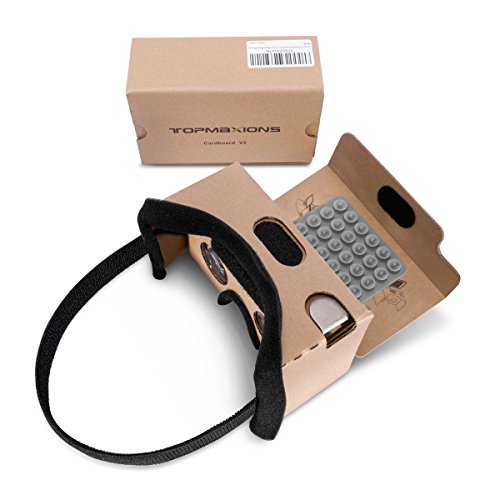
- ✓ Comfortable fit
- ✓ Secure phone grip
- ✓ Lightweight portability
- ✕ Narrow FOV
- ✕ Basic build quality
| Device Compatibility | Fits smartphones from 3.5″ to 6.0″ |
| Nose/Forehead Padding | Sponge nose pad and forehead pad for comfort |
| Headband Adjustment | Lengthened headband to accommodate different head sizes |
| Mounting System | Triangular wing presses to contact screen for secure alignment |
| Protection Feature | Unique suction cup design to prevent phone scratches and keep device from falling |
| Brand/Model Compatibility Note | Designed for Google Cardboard-style VR experiences; marketed for 3D movies and games |
You know that moment when a tiny upgrade changes everything? That’s this Google Cardboard headset’s suction cup design in action.
You’ll notice how the cups grip your phone securely without scratching the screen, and it instantly feels more confident to toss the unit into a bag for travel.
The 6-inch frame feels surprisingly sturdy for a budget option, and the added sponge nose pad plus forehead pad? It makes a real difference after a long movie binge.
I wore it for an afternoon of 3D shorts, and the face comfort kept me from fiddling with straps every few minutes.
Speaking of straps, the lengthened headband is a thoughtful touch. It accommodates different head sizes without it feeling tight or loose, which is a big win when you’re juggling glasses and long gaming sessions.
The fit remains stable, so you can focus on the action rather than squeaky adjustments.
Setup is simple: pop your phone in, press the triangular wings to contact the screen, and you’re ready to dive into the 3D world. It’s lightweight enough to use on the couch or at your desk, and the compact build makes it easy to share a quick VR moment with a friend without pulling out a heavier rig.
Real-world use feels like a casual at-home theater: clear enough for 3D movies, responsive for lighter games, and forgiving enough to experiment with different phone brands (3.5″–6.0″). If you’re chasing a no-frills, pocket-friendly VR fix, this is the kind of low-stakes option that won’t demand a premium price.
It’s not flashy, and the field of view isn’t cinema-wide, but for Nvidia Shield users looking for a budget, portable headset to test the waters, it hits the sweet spot. You’ll appreciate the comfort and stability more than you expect for the price.
VR Headset with Controller for 5–7 Inch Phones (Android)

| Display / Field of View | Immersive 120° FOV |
| Phone Compatibility | Designed for smartphones 5.0–7.0 inches, non-curved; remove phone case for best fit |
| Lenses | Anti-blue light HD lenses with adjustable pupil and focal distance |
| Headset Comfort Features | Adjustable head strap and soft facial padding |
| Inclusion / Input Device | Wireless controller included for navigation, music/video control; compatibility varies by OS/app |
| Setup / Content Access | Easy setup with compatible VR apps or split-screen 360° videos; multilingual manuals |
You pop the headset on and notice the 120° field of view immediately, like stepping into a tiny cinema that travels with you. The first thing that hits you is the soft facial padding and the adjustable head strap—comfort that sticks around, not just during a quick demo.
As you drop in a 360 video, the lenses feel forgiving once you tweak the pupil and focal distance. It’s not a perfect cinema spell, but the clarity is decent enough to keep you immersed without eye strain for short sessions.
The HD anti-blue light lenses do help your eyes feel calmer after a few minutes of scrolling through VR tours.
Phone fit is straightforward: you’ll want a 5 to 7 inch non-curved screen, and yes, you’ll need to remove the case for the best alignment. The included wireless controller is handy for quick navigation, though some apps only support basic controls depending on the OS.
Setup is pleasantly quick. You’ll download a compatible VR app or play a split-screen 360 video, slide your phone in, and start dialing in the lens distance until the image snaps into crisp focus.
The multilingual manual is a nice touch if you’re sharing the headset with friends who speak other languages.
In real-world use, this headset shines for casual VR gaming and casual movie nights on the go. It’s light enough for travel and affordable enough for a spare headset beside the couch—perfect for quick demos with Nvidia Shield or similar devices, where you want a low-friction experience without breaking the bank.
Profits are fair: solid comfort, easy setup, and a broad phone compatibility range make it a reliable everyday VR option. If you want something that travels well and doesn’t demand a gaming PC, this one ticks a lot of boxes.
VR Headset 3D VR Glasses Universal Virtual Reality Goggles

- ✓ Sharp adjustable IPD
- ✓ Lightweight and portable
- ✓ Eye-friendly coating
- ✕ Basic plastic feel
- ✕ Limited premium features
| Display Compatibility | Smartphone-based VR headset compatible with 4.7–7.0 inch screens |
| Interpupillary Distance (IPD) Adjustment | adjustable via gear mechanism for personalized eye separation |
| Optical Features | Anti-blue light lens coating to reduce glare and eye strain |
| Weight / Comfort | Lightweight design with T-shaped headband for adult and child comfort |
| Field of View / Immersion | 360-degree panoramic view with wide field of view from large lens barrel |
| Headset Dimensions / Portability | Compact, portable design suitable for home or outdoor use |
You tilt the headset on, and that instantly familiar snug weight sits just right on your temples. The standout moment?
The adjustable interpupillary distance snapping into place with a satisfying click, giving you a surprisingly sharp 3D horizon right out of the gate.
The build feels purposeful without being bulky, and the T-headband hugs differently shaped heads with a light, breathable fit. It’s lightweight enough to wear for a movie, yet sturdy enough to handle quick headset moves during a game session.
Inside, the lenses glare a bit less thanks to anti-blue light coating, which helps reduce eye strain after longer sessions. You’ll notice the wide field of view once you align your eyes with the box; it’s easy to lose yourself in the 360-degree panorama without constant micro-adjustments.
For compatibility, the headset claims to support 4.7-7 inch screens, so you can slip in a bunch of your favorite phones. It’s portable enough to toss into a bag for a friend’s house or a park hangout, which is a simple win if you’re on the go.
In practice, the myopia-friendly design matters—your eyes won’t scream after a short movie binge, and you’re less likely to feel fatigue when you’re actively exploring a VR world. The optical setup keeps glare down, which helps you maintain a clean, immersive 3D view when you’re jumping between scenes or games.
Use-case wise, it’s a solid, budget-friendly option for casual VR experiences, especially if you’re pairing it with a Shield or similar device for light VR sessions. The simple, no-fruss setup gets you from unboxing to active play or viewing in minutes, not hours.
All told, it’s a practical, comfortable launching pad into VR for everyday users who want quick immersion without breaking the bank. If you’re after portability, reasonable comfort, and a straightforward experience, this headset checks those boxes well.
VR Sweat Mask for Meta Quest 3S VR Headsets Quest 3 Foam

- ✓ Drying, breathable surface
- ✓ Comfortable, adjustable fit
- ✓ Easy to clean and reuse
- ✕ Not a cure-all for heat
- ✕ Adds slight bulk to seal
| Material | Breathable sponge material |
| Fit & Adjustability | Adjustable strap for universal fit (adults and children) |
| Moisture Management | Sweat-absorbing/keeping face dry to prevent moisture build-up |
| Comfort Features | Soft surface to reduce facial pressure and prevent marks |
| Maintenance | Washable and reusable; easy to clean after use |
| Compatibility | Designed for VR headsets in the Quest/Meta Quest family (VR mask for visual headsets) |
You notice it first in the salt-swept glow of a long gaming session—the VR Sweat Mask sits lighter on your face than you expected, almost like a thin sponge halo. Compared to the bulkier pads I’ve worn, this one feels oddly deliberate, a tiny shield against moisture and heat.
Slipping it on, you’ll feel the breathable material pull just enough to keep the mask from sliding, while the adjustable strap lets you dial in a snug fit without cranking it tight. It’s a simple swap—from a rigid foam pad to this soft, spongey layer—and you’ll notice the difference in facial comfort within minutes.
During extended play, the mask’s moisture-absorbing surface does work, wicking sweat away rather than letting it pool around your nose. It’s not miracle-material, but you’ll appreciate the dry feel when you’re pushing through a long quest or sweaty sprint in a rhythm game.
Cleaning is refreshingly straightforward—rinse, air dry, and it’s ready for the next run. The reusable design means you don’t need to swap pads every week, which is a win if you game daily.
It also helps with preventing facial marks after back-to-back sessions, which used to be a nuisance for me.
As for compatibility, you’ll find the fit surprisingly universal thanks to the adjustable strap. It works with Meta Quest 3S and other headsets without adding bulk, so you won’t feel claustrophobic during a rainstorm of a multiplayer match.
In real-world use, the mask smooths over minor pressure points and feels gentle against sensitive skin. It’s not a high-tech gadget, but the comfort and hygiene benefits are tangible after you’ve spent a few hours in VR.
For the price, it’s a smart, practical upgrade that makes long sessions more tolerable.
All told, if you’re chasing a more comfortable, drier VR session, this mask earns its keep. It won’t revolutionize your visuals, but it does deliver steady everyday comfort when you’re in the zone.
What Should You Look for in a VR Headset for NVIDIA Shield?
When choosing a VR headset for NVIDIA Shield, several key factors should be considered to ensure compatibility and an immersive experience.
-
Compatibility: Verify that the headset can connect with the NVIDIA Shield. Some popular options include the Oculus Quest 2 and HTC Vive, both offering robust support for PC-based streaming from the Shield.
-
Resolution and Refresh Rate: Look for headsets with high resolution (at least 1080p per eye) and a refresh rate of 90Hz or higher. This brings clarity and smoothness, essential for gaming.
-
Field of View (FOV): A wider FOV enhances immersion. Choose a headset with at least 100 degrees for a more engaging experience.
-
Comfort: Since VR sessions can last for hours, consider a headset with adjustable straps, lightweight design, and breathable materials to ensure comfort during extended gaming.
-
Audio Quality: Integrated or high-quality audio can significantly enhance the experience. Look for headsets with spatial audio or compatibility with premium headphones.
-
Tracking and Controllers: Adequate tracking systems (inside-out or outside-in) ensure precision in movement. Invest in controllers that are intuitive and responsive for a better interaction with the VR environment.
Evaluating these factors will help in selecting the best VR headset tailored for the NVIDIA Shield, optimizing your gaming experience.
Which VR Headsets are Best Suited for NVIDIA Shield Compatibility?
When selecting a VR headset compatible with the NVIDIA Shield, consider the following options that provide excellent performance and usability.
-
Oculus Quest 2: This standalone headset is praised for its affordability and wireless capability. With the Link feature, it can connect to the Shield, allowing for an immersive experience with a wide range of VR games.
-
Valve Index: Known for its exceptional tracking and high-quality visuals, the Valve Index can integrate with the NVIDIA Shield through streaming. It delivers a superior field of view and refresh rate, enhancing immersion.
-
HTC Vive Cosmos: This headset features modular faceplates for various configurations, including the ability to connect with PC gaming systems like the NVIDIA Shield. Its user-friendly setup and solid tracking make it a favorable choice for gamers.
-
Pimax 5K Plus: For users seeking a high-resolution experience, the Pimax 5K Plus offers expansive visuals and impressive specifications. Its compatibility with NVIDIA graphics hardware ensures optimal performance for detailed VR content.
These VR headsets provide various features and capabilities suited for users looking to enhance their gaming experience with the NVIDIA Shield. Consider specific requirements, such as graphics performance and comfort, when making a choice.
What Are the Key Features that Enhance Performance with NVIDIA Shield?
With multiple USB ports, HDMI output, and wireless capabilities, the NVIDIA Shield allows for easy connection to VR headsets and accessories, ensuring a seamless setup and operation. This robust connectivity makes it convenient for users to integrate various devices into their gaming setup.
The Shield is versatile in its compatibility with various VR headsets, making it easy for users to choose their preferred device for an optimal virtual reality experience. This flexibility allows gamers to select headsets that best fit their preferences and budgets.
It offers customizable control options, allowing users to fine-tune their gaming experience according to personal preferences, which can enhance comfort and performance in VR environments. This feature is particularly beneficial for long gaming sessions, as it allows players to create a setup that minimizes discomfort and maximizes enjoyment.
What Are the Advantages of Using a VR Headset with NVIDIA Shield?
The advantages of using a VR headset with NVIDIA Shield include enhanced graphics performance, seamless integration, and versatile gaming experiences.
- Enhanced Graphics Performance: Using a VR headset with the NVIDIA Shield allows users to experience high-quality graphics due to the powerful GPU capabilities of the Shield. This hardware is optimized for rendering immersive environments, ensuring that virtual worlds appear more realistic and engaging.
- Seamless Integration: The NVIDIA Shield is designed to work smoothly with various VR headsets, making setup and compatibility straightforward. This seamless integration allows users to easily switch between VR applications and traditional gaming without technical hitches.
- Versatile Gaming Experiences: With the combination of VR headsets and the NVIDIA Shield, gamers can access a wide range of VR titles and applications. This versatility not only includes gaming but also extends to virtual reality experiences in movies and educational content, making it a multifaceted entertainment device.
- Low Latency Streaming: The NVIDIA Shield offers low-latency game streaming, which is crucial for VR experiences where timing is essential. This feature ensures that the gameplay feels responsive and natural, reducing motion sickness and enhancing user immersion.
- Access to Cloud Gaming Services: Users can take advantage of cloud gaming services supported by the NVIDIA Shield, such as GeForce NOW. This enables gamers to play high-end PC titles in VR without needing a powerful gaming PC, making VR more accessible and convenient.
Which VR Headsets Offer the Best Value for NVIDIA Shield Users?
The best VR headsets for NVIDIA Shield users combine compatibility, performance, and affordability for an enhanced gaming experience.
- Oculus Quest 2: This standalone headset offers excellent value with its high-resolution display and versatile functionality.
- Valve Index: Known for its high-quality build and superior tracking, the Valve Index provides an immersive experience but at a higher price point.
- HTC Vive Cosmos: With a user-friendly setup and solid performance, the Vive Cosmos is a great choice for users looking for a balance of quality and price.
- Pimax 5K Plus: This headset is ideal for users seeking a wide field of view and high resolution, although it may require a more powerful PC to run effectively.
- HP Reverb G2: Offering one of the highest resolutions available, the Reverb G2 is perfect for users focused on visual fidelity, especially in simulation games.
The Oculus Quest 2 is a popular choice due to its standalone capabilities and compatibility with PC gaming through Oculus Link, making it versatile for NVIDIA Shield users. Its high-resolution display and comfortable design enhance the gaming experience significantly.
The Valve Index stands out for its exceptional tracking and high refresh rate, which provides an incredibly smooth experience. However, it requires a powerful PC and is on the pricier side, making it a more serious investment for dedicated gamers.
The HTC Vive Cosmos features a modular design that allows for easy upgrades and a straightforward setup process. Its inside-out tracking and good visual quality make it a solid option for casual gamers seeking convenience without sacrificing too much performance.
The Pimax 5K Plus is known for its expansive field of view and high-resolution displays, making it attractive for immersive gaming. However, it necessitates a powerful computer to fully utilize its features, which could be a limitation for some NVIDIA Shield users.
The HP Reverb G2 excels in offering stunning visuals with its high pixel density, making it an excellent choice for users who prioritize graphics quality. It’s particularly suited for simulation enthusiasts who want to fully immerse themselves in detailed environments, although it may require additional setup for optimal performance with the NVIDIA Shield.
How Do Different Prices Align with Features for NVIDIA Shield Compatibility?
When considering the best VR headset for NVIDIA Shield compatibility, various models stand out based on features and pricing.
- Oculus Quest 2: Affordable and versatile, the Oculus Quest 2 offers standalone capabilities as well as the option to connect to a PC for an enhanced experience.
- HTC Vive Cosmos: Known for its high-resolution display and comfortable design, the HTC Vive Cosmos requires a connection to a gaming PC but provides an immersive experience with its tracking technology.
- Valve Index: Priced higher, the Valve Index boasts advanced tracking and high refresh rates, making it a premium choice for serious gamers seeking the best performance.
- Pimax 5K Plus: This headset offers an ultra-wide field of view and high-resolution display, appealing to users who prioritize visual fidelity and are willing to invest significantly.
- PlayStation VR: While primarily designed for PlayStation, it can work with NVIDIA Shield using specific setups, providing an affordable entry point into VR gaming.
The Oculus Quest 2 is particularly notable for its affordability and versatility. It can function independently or connect to a PC, making it a great option for those who want both casual and more in-depth VR experiences. Its compatibility with NVIDIA Shield enhances its appeal as it can stream games wirelessly, providing flexibility.
The HTC Vive Cosmos is another solid choice, offering a comfortable fit and high-resolution graphics. Its advanced tracking capabilities make it ideal for those who want a more immersive experience, though it requires a powerful gaming PC to operate effectively alongside the NVIDIA Shield.
The Valve Index is considered a top-tier option, with its cutting-edge technology allowing for precise tracking and a refresh rate that enhances gameplay. Its higher price point reflects its premium features, making it suitable for dedicated gamers looking for the best in VR performance.
For users who prioritize visual fidelity, the Pimax 5K Plus is a standout option. With an impressive field of view and high-resolution display, it caters to enthusiasts who want expansive visuals, but it comes at a higher cost and requires a robust setup to function optimally with NVIDIA Shield.
Lastly, PlayStation VR, while not primarily designed for NVIDIA Shield, can still be utilized through certain configurations. This makes it an accessible choice for those who already own the headset and are looking to explore VR gaming without investing in entirely new hardware.
What Considerations Should You Keep in Mind Before Buying a VR Headset for NVIDIA Shield?
Resolution: The resolution of the VR headset is critical to achieving a sharp, detailed image. Higher resolutions minimize the screen door effect, enhancing the realism and depth of your virtual environment, which is especially important for gaming.
Field of View (FOV): A headset with a larger FOV allows for a more immersive experience, as it simulates a wider view of the virtual world. This can make games feel more engaging and realistic, as you can see more of your surroundings without needing to turn your head excessively.
Comfort and Fit: Since VR sessions can last a long time, the comfort of the headset is essential. Look for adjustable straps, breathable materials, and a lightweight design to ensure you can wear the headset comfortably for extended periods without strain.
Tracking Technology: The accuracy of your movements in VR relies on the headset’s tracking technology. Consider headsets that offer both inside-out and outside-in tracking for the best performance, as this can significantly enhance your gameplay experience.
Audio Quality: Good audio is as important as high-quality visuals in VR. Some headsets come with built-in audio solutions, while others allow for external headphone connections, which can provide a more immersive audio experience crucial for gaming.
Price: VR headsets come at various price points, so it’s essential to establish a budget before shopping. Compare features and ensure that the headset you choose provides a good balance of performance and value for your money.
Game Library: Finally, consider the types of games and applications available for the headset. A robust library that includes titles compatible with the NVIDIA Shield will enhance your enjoyment and ensure that you get the most out of your investment.
Related Post: