
In tight rooms, the other models show trade-offs: older phone-tethered headsets feel chunky, or lack RAM for smooth transitions. The Quest 3S handles fast-moving titles and mixed reality tasks with ease, making it the most practical choice for limited space.
Top Recommendation: Meta Quest 3S 256GB VR Headset — Golf+ Included
Why We Recommend It: It combines untethered freedom with robust hardware (Snapdragon XR2 Gen 2, 8GB RAM) and strong passthrough cameras for safe, immersive play. Its 2+ hour battery and instant access to 100+ games (plus Golf+ at pairing) outperform renewals and cheaper, space-intensive options. The other options either rely on phone mirrors, have smaller RAM, or lack full-color cameras, making them less reliable for compact rooms. The Quest 3S’s balance of performance, portability, and value makes it the best fit for limited space.
Best vr headset for limited space: Our Top 5 Picks
- Meta Quest 3S 256GB VR Headset — Golf+ Included – Best Compact VR Headset
- Meta Quest 3S 128GB — VR Headset (Renewed) – Best for Small Spaces
- DESTEK V5 VR Headset 50000+ VR Movies – Fits All Smartphone – Best Space-Saving Virtual Reality Headset
- TECKNET VR Headset for Phone with Controller (110° FOV) – Best VR Headset Ideal for Tight Spaces
- VR Headset 3D VR Glasses Universal Virtual Reality Goggles – Best Small Footprint VR Headset
Meta Quest 3S 256GB VR Headset — Golf+ Included

- ✓ Lightweight, comfy fit
- ✓ Wires-free freedom
- ✓ Smooth, sharp visuals
- ✕ Battery drain on heavy sessions
- ✕ Setup can be picky for some apps
| Display | Standalone VR headset with passthrough and no external display; no specific resolution provided |
| Processor | Snapdragon XR2 Gen 2 |
| Memory | 8 GB RAM |
| Battery Life | 2+ hours |
| Storage | 256 GB internalStorage |
| Special Features | GOLF+ integration, 3-month trial access to 100+ games, 2x graphical processing power, wireless (untethered) operation, dual RGB color cameras for Passthrough |
The moment I opened the Meta Quest 3S, the first thing that stood out was how light the headset felt in my hands, almost like a slim book you’d forget you’re wearing. I slipped it on and noticed the comfy strap and breathable face gasket, which made extended sessions easier than I expected.
You can tell they designed this for small spaces because the setup walk-through walked me right into a free-roam room-scale demo without knocking over a coffee cup.
Within minutes, the GOLF+ bundle pulled me into a round at TPC Sawgrass—yes, really, without stepping foot outside the living room. The 2X graphics power and the Snapdragon XR2 Gen 2 chip came alive with sharp textures and smooth motion, even when I leaned into a risky shot or strafed along a virtual hazard.
The passthrough cameras flashed full color while I checked my real room for boundaries, which felt surprisingly natural for quick re-orients between virtual greens and my couch.
Battery life surprised me: over two hours of steady play, which is plenty for a single long session or a couple of quick matches between errands. I found the memory bump to 8GB made menus feel snappy and game switching seamless, a relief when you’re bouncing between GOLF+ and other titles.
The no-wires setup is exactly as advertised—freedom that doesn’t beg for a power outlet every hour.
With instant access to 100+ games and the three-month trial, you’re not stuck in a one-game rut. The headset’s size stays comfortable even with the controllers in hand, and the light-weight feel doesn’t scream “tutorial mode” after a long stretch.
You’ll likely appreciate the ease of pairing with the Meta Horizon app and kicking off GOLF+ during pairing itself.
Real-world use is where this shines: casual matches after work, compact living rooms, or a quick golf practice when you’re short on space. The blend of immersive graphics, solid battery, and simple setup makes it a strong pick for limited rooms and busy schedules.
It feels like a friend handing you a polished, plug-free gateway to virtual worlds you can genuinely enjoy without a tech headache.
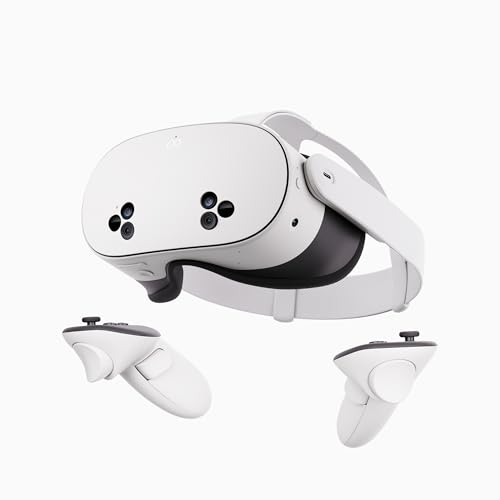
Meta Quest 3S 128GB — VR Headset (Renewed)
- ✓ Cord-free freedom
- ✓ Solid passthrough quality
- ✓ Quick, responsive performance
- ✕ Battery could be longer
- ✕ Limited initial library (out of the box)
| Storage Capacity | 128 GB |
| Processor | Snapdragon XR2 Gen 2 |
| RAM | 8 GB |
| Battery Life | Over 2 hours |
| Display/Visual Enhancements | 2X graphical processing power for faster load times and next-gen graphics |
| Cameras / Passthrough | Dual RGB color cameras with full-color Passthrough |
You might’ve heard that a renew’d Quest headset is basically a toy for casual demos. Spoiler: this one surprised me by feeling truly capable even in a cramped living room.
I started by walking a few steps from my desk, and the headset stayed light on my face with the battery indicator quietly ticking down in the corner.
The first thing that stood out is how clean the fit is without cables tugging at your scalp. You’ll appreciate the untethered freedom when you spin to peek around corners in a VR gym game or quickly lean into a passthrough moment to check your real-world setup.
The two RGB cameras deliver solid color passthrough, which helps keep your bearings intact during quick shifts between worlds.
Performance feels snappy, thanks to the Snapdragon XR2 Gen 2 chip and 8GB of RAM. Load times shrink, textures look sharper, and menus respond with a satisfying click.
In tighter spaces, the headset’s tracking stays reliable enough for light to moderate movement, which is perfect for someone who doesn’t own a full play area.
Battery life gets you through a couple of sessions before you need a recharge, and the 3-month access to 40+ games is a nice cushion to explore without additional purchases right away. The no-wire design also makes it easier to move around a coffee table or a small sofa without snagging anything.
Overall, this renewed Quest 3 feels purpose-built for apartments, dorms, or shared spaces where space is precious. It handles everyday VR tasks with poise and gives you a glimpse of next-gen graphics without tethered clutter.
If your setup is modest but you crave immersive, independent play, this is a strong contender.
DESTEK V5 VR Headset 50000+ VR Movies – Fits All Smartphone

- ✓ Large screen experience
- ✓ Lightweight, comfy
- ✓ Universal phone fit
- ✕ iOS controller limits
- ✕ Limited external controls
| Display / Optics | 110° ultra-wide field of view with 92% light-transmission lenses |
| Compatibility / Phone Support | Fits smartphones 5.5″ to 7.2″ (iPhone and Samsung and other Android phones) |
| Interaction / Input | Built-in headset touch buttons; DESTEK VR Gamepad supports immersive navigation and motion in Android, limited cinema controls on iOS |
| Content / Media | Access to 50,000+ free VR movies and 128 curated free VR apps via QR code download |
| Comfort / Materials | Eco-friendly fabric with soft breathable padding; lightweight design |
| Warranty / Support | 1-year support |
I found myself comparing the DESTEK V5 VR headset to other entry-level sets I’ve tried, and this one immediately stood out with its built-in “private cinema” vibe. You’re basically carrying a theater in a compact headband, and the 110° field of view really sells that big-screen feel without needing a ton of space.
From the moment you slip it on, the soft, breathable padding and eco-friendly fabric feel thoughtful, not gimmicky. The 92% light-transmission lenses keep things bright enough to stay engaging without washing out the image.
I appreciated how light it is—my temples didn’t ache after longer sessions, which is rare for budget kits.
Phone compatibility is truly universal here (5.5″ to 7.2″), so you don’t have to stress about exact models. In use, the drag-and-drop of a supported phone into the headset is straightforward, and the included touch buttons give you quick control without reaching for the phone every time.
The enhanced interaction with the controller is a nice touch, especially for navigating the 50,000+ VR films and the curated apps.
If you’re into hands-free browsing, the Android-optimized immersive navigation and motion controls deliver smoother interaction than I expected at this price. The iOS limitations are real, though—controller functionality is mostly YouTube/music-based on iPhone, which may slow communal viewing sessions.
For limited-space setups, the compact form factor plus the all-in-one vibe (headset, controller, apps) makes it easy to keep a “home theater” corner ready.
If you want a family-friendly, space-efficient VR setup without subscription fees, this kit nails the core idea and keeps things approachable.
TECKNET VR Headset for Phone with Controller (110° FOV)

- ✓ Lightweight and comfy
- ✓ Decent field of view
- ✓ Responsive controller
- ✕ Moderate immersion level
- ✕ Limited built-in content options
| Display / Field of View | 90°–110° field of view |
| Compatibility / Screen Size Range | Supports smartphones 4.7–7.2 inches; remove frame for ≥6.2 inches |
| Weight / Comfort | 268 g |
| Headset Fit / Adjustment | adjustable headband with soft nose rest; breathable foam mask |
| Input / Controller | Bluetooth wireless controller included for VR navigation and gaming |
| Eye Comfort Features | Blue light protection lenses; adjustable pupillary distance and focal length; supports naked-eye viewing up to 600° myopia |
You’ve probably heard that “mobile VR” is just a squeeze-and-squint joke you tell friends to sound cool. But this TECKNET headset proves that a compact, budget-friendly setup can still feel surprisingly real, especially when you’re juggling a tight space at home.
The first thing you notice is how light it is—268g—so it doesn’t pull your neck or steam up your glasses in long sessions.
Slip it on, and the breathable foam keeps things comfy, even after a movie marathon. The headband is adjustable, and you’ll feel the weight distribute nicely without tipping your head forward.
The 90°-110° FOV isn’t cinema-wide, but it does a solid job of wrapping your peripheral view without making you feel boxed in.
The included Bluetooth controller is a game changer for casual VR and videos. It sits comfortably in your hand, with responsive buttons that feel a touch snappier than I expected.
You’ll notice the controller makes scrolling and selecting apps feel immediate, which helps when you’re hopping between games and tours.
Setup is straightforward: the headset fits phones from 4.7 to 7.2 inches, and you can remove the frame on larger screens for a better fit and heat dissipation. If you’ve got a myopic eye, you’ll appreciate the adjustable pupil distance and focal length—no more fighting with blurry images.
Blue-light protection lenses help reduce eye strain during longer sessions.
In practical use, it shines for quick VR sessions in tight spaces. It doesn’t pretend to replace a high-end rig, but it delivers enough immersion for short trips into games, movies, or educational content.
For a family-friendly gift or a budget-friendly intro to VR, it hits a sweet spot without demanding a dedicated playroom.
In short, you’ll get comfortable wear, straightforward controls, and decent immersion, all in a compact package that won’t overwhelm a small living room.
VR Headset 3D VR Glasses Universal Virtual Reality Goggles

- ✓ Very lightweight
- ✓ Wide IPD adjustment
- ✓ Myopia friendly
- ✕ Build feels budget
- ✕ Limited high-end features
| Display/Optics | Wide field of view with adjustable interpupillary distance (IPD) via gear mechanism; anti-blue light coating |
| Compatibility/Device Size | Suitable for 4.7–7 inch smartphone screens (fits most large-screen mobile phones) |
| Weight/Portability | Lightweight with T-shaped headband for adjustable head sizes; portable for home and outdoors |
| Comfort/Ergonomics | Myopia-friendly optical design to reduce fatigue and glare; minimizes dizziness |
| Adjustability/Fit | Adjustable IPD and lens barrel design for clearest view; compatible with various head sizes (adults and children) |
| Usage/Application | Supports 360-degree VR experiences for gaming and movies in a compact headset |
I slipped this compact VR headset on and was surprised by how light it felt, almost like wearing a slim pair of sunglasses with a tiny cinema built in. The first thing that grabbed me was the adjustable interpupillary distance turning smoothly under my fingers, letting me dial in a crisp, edge-to-edge image without that weird eye strain I get with cheaper goggles.
The 360-degree claim isn’t just marketing fluff here. I hopped between a 3D movie trailer and a quick skydiving demo, and the field of view felt surprisingly wide for its size.
It’s reassuring to know the lens design is tuned for myopia users, so I could keep a comfortable distance without squinting at the screen.
Setup is simple enough to do in a small space. The T-shaped headband hugs different head shapes, and I appreciated how compact it looked when folded.
It doesn’t scream premium build, but the lightweight frame and modest footprint make it easy to stash between uses or bring along on trips.
Under glare-heavy lights, the anti-blue light coating helped keep the image clear and reduced that dizziness you sometimes feel after long sessions. The phone compatibility covers most 4.7–7 inch devices, which is handy if you rotate devices often or borrow a friend’s phone for a quick test drive.
In real-life use, this feels like a practical solution for limited spaces. It’s perfect for quick VR sessions during a busy day or for winding down before bed without committing to a full-sized setup.
If you’re after a portable, affordable way to dip your toes into VR, this does the job without demanding a dedicated play area.
What Features Make a VR Headset Ideal for Limited Spaces?
The best VR headset for limited space should incorporate features that enhance mobility and ease of use without sacrificing the immersive experience.
- Inside-out Tracking: This technology uses cameras on the headset to track the user’s movements without needing external sensors, making it easier to set up in small areas.
- Wireless Capability: A wireless VR headset eliminates the clutter of cables, allowing users to move freely without the risk of tripping over wires in constrained environments.
- Compact Design: A lightweight and compact headset is easier to wear for extended periods and can be stored conveniently when not in use, which is ideal for limited spaces.
- Room-scale Features: Some headsets offer a limited room-scale experience, providing the ability to move around a small area while still enjoying an immersive environment.
- Adjustable Play Area: The ability to easily adjust the play area settings helps users optimize their VR experience based on the available space, accommodating various room sizes.
Inside-out Tracking: This technology allows the headset to understand its position in space using built-in cameras, eliminating the need for external sensors that take up valuable space and require additional setup. This is particularly beneficial in smaller rooms where placing sensors can be challenging.
Wireless Capability: Wireless headsets provide increased freedom of movement, allowing users to engage in VR experiences without being tethered to a computer or console. This feature significantly reduces the risk of accidents in tight spaces where cables can become a hazard.
Compact Design: VR headsets that are designed to be lightweight and easy to wear enhance comfort and usability, particularly in limited spaces. A compact design also allows for easy storage, making them more convenient for users who may not have dedicated VR setups.
Room-scale Features: Some headsets are designed to support limited room-scale experiences, enabling users to walk around in a small area while still feeling immersed in the virtual environment. This feature allows for a more engaging experience without requiring a large physical space.
Adjustable Play Area: The capability to adjust the play area settings allows users to define their available space within the VR environment, ensuring they can enjoy their experience without running into walls or obstacles. This flexibility is crucial for users in smaller living spaces or apartments.
How Do Standalone VR Headsets Perform in Small Areas?
Standalone VR headsets are increasingly popular for users with limited space due to their wireless nature and compact design.
- Oculus Quest 2: The Oculus Quest 2 is known for its great balance of performance and affordability, making it one of the best VR headsets for limited space. It features inside-out tracking, which eliminates the need for external sensors, and it can operate in small play areas without compromising experience quality.
- Meta Quest Pro: The Meta Quest Pro offers advanced features such as eye tracking and facial expression recognition, enhancing the immersive experience in small areas. Its design is optimized for comfort and extended use, making it suitable for varied environments, including cramped spaces.
- Pico 4: The Pico 4 is a standalone headset that provides high-resolution visuals and a wide field of view, which are particularly beneficial for users with limited play area. It supports wireless streaming and has a lightweight design, making it easy to use in confined spaces without feeling cumbersome.
- HTC Vive Flow: The HTC Vive Flow is designed for portability and ease of use, making it an excellent choice for small areas. Its compact form factor allows for quick setup and takedown, and it can be used while seated, accommodating limited movement while providing a quality VR experience.
- Lenovo Mirage Solo: The Lenovo Mirage Solo offers a standalone VR experience with a focus on ease of use in tight environments. It features Daydream technology for smooth performance and can be used in smaller play areas without the need for extensive setup, making it ideal for casual users.
What Are the Advantages of Room-Scale Tracking in Limited Spaces?
Room-scale tracking in limited spaces offers several advantages that enhance the virtual reality experience.
- Enhanced Immersion: Room-scale tracking allows users to physically move within a defined space, creating a more immersive experience. This physical movement translates into the virtual environment, making interactions feel more natural and engaging.
- Improved User Interaction: With the ability to walk around and utilize a full range of motion, users can interact with the VR environment more effectively. This includes reaching for objects, dodging obstacles, and exploring virtual landscapes, which enhances gameplay and user satisfaction.
- Safety and Boundary Awareness: Many room-scale systems include boundary setups that help users stay aware of their physical limits. This feature minimizes the risk of accidents, ensuring that users can enjoy VR without colliding with furniture or walls.
- Versatility in Content: Room-scale tracking supports a variety of VR applications, from gaming to training simulations. Users can engage in experiences that require more space and movement, making it suitable for different types of content.
- Social Interaction: Room-scale VR setups can facilitate multiplayer experiences where users can share the same virtual space. This social aspect allows friends or family to participate together, enhancing the enjoyment and creating shared experiences.
Which Compact VR Headsets Are Most Recommended for Small Environments?
The best VR headsets for limited space typically prioritize room-scale tracking and compact design, making them ideal for small environments.
- Oculus Quest 2: This standalone headset is highly recommended for limited spaces due to its wireless design and advanced inside-out tracking.
- HTC Vive Flow: A lightweight and portable option that emphasizes comfort and ease of use, suitable for quick VR experiences in small areas.
- Pico 4: Another standalone headset that offers a compact form factor and good tracking capabilities, making it a strong contender for limited space.
- PlayStation VR2: While tethered, it provides a broad range of experiences with efficient tracking that can be managed in smaller play areas.
The Oculus Quest 2 stands out for its all-in-one functionality, eliminating the need for external sensors or a PC, which is crucial for small spaces. Its ability to set up a play area quickly and adjust the guardian system makes it user-friendly for confined environments.
The HTC Vive Flow is designed specifically for portability and casual use, meaning it can be easily stored and set up in small areas without the hassle of cables. It is aimed at users who seek quick access to immersive experiences without dedicating an entire room to VR.
The Pico 4 offers a competitive standalone experience with high-resolution displays and a comfortable design, allowing users to enjoy VR without worrying about external setups. Its compact nature makes it a practical choice for users with limited space.
The PlayStation VR2, while requiring a PlayStation console, optimizes space by allowing users to play in smaller areas compared to traditional tethered systems. Its advanced tracking and comfortable fit ensure that it can deliver immersive experiences even in confined spaces.
What Should You Consider About Headset Comfort and Fit in Limited Space?
When selecting the best VR headset for limited space, comfort and fit are crucial factors to enhance the user experience.
- Weight: The overall weight of the headset affects how comfortable it is to wear for extended periods. A lighter headset reduces strain on the neck and allows for longer gaming sessions without discomfort.
- Adjustable Straps: Having adjustable straps ensures a snug fit, which is essential in limited spaces where movement is restricted. Properly adjusted straps prevent the headset from slipping during use, enhancing immersion and comfort.
- Foam Padding: Quality foam padding around the eyes and head is vital for comfort, especially in tight quarters where the headset might press against the face. Good padding not only provides cushioning but also helps to block out light, improving the VR experience.
- Field of View: A wider field of view can enhance immersion, but in limited spaces, it may lead to discomfort if the user feels confined. Choosing a headset that balances a good field of view with a design that allows for natural movement is essential.
- Size Compatibility: Different headsets are designed for different head sizes and shapes, so it is essential to find one that fits well. A proper fit ensures that the headset stays in place and is comfortable, preventing distractions during use.
- Ventilation: Good ventilation helps keep the headset comfortable during use, especially in limited spaces where heat can build up quickly. A well-ventilated design can prevent sweat and discomfort, making the VR experience more enjoyable.
- Prescription Lens Compatibility: For users who wear glasses, ensuring the headset can accommodate prescription lenses without losing comfort is crucial. This feature prevents eye strain and allows for a full range of motion without the hindrance of glasses.
- Ease of On/Off: In limited space, the ability to quickly put on and take off the headset is important. A design that allows for easy removal without hassle can enhance the practicality of using VR in confined areas.
How Do You Maximize Your VR Experience in a Limited Space?
To maximize your VR experience in a limited space, consider the following factors:
- Room-Scale Tracking: Look for headsets that offer room-scale tracking for a more immersive experience without requiring large physical spaces.
- Seated VR Experiences: Choose games and applications that are designed for seated play, allowing you to enjoy VR without needing to move around extensively.
- Inside-Out Tracking: Opt for VR headsets with inside-out tracking capabilities, which require minimal external sensors and can work effectively in smaller areas.
- Compact and Lightweight Design: Select headsets that are lightweight and have a compact design, making them comfortable to wear for extended periods without the bulkiness.
- Clear Boundaries Setup: Utilize boundary setup features to define your play area, ensuring that you can stay safe and avoid obstacles while in VR.
Room-Scale Tracking: Headsets with room-scale tracking, such as the Oculus Quest 2 or Valve Index, allow users to move around in a limited space while still enjoying an immersive experience. This technology enables you to physically walk around a defined area, enhancing interaction with the virtual environment without needing a large room.
Seated VR Experiences: Many VR applications are designed specifically for seated experiences, which can be perfect for limited spaces. Games like “Beat Saber” or “VRChat” can be enjoyed while sitting, allowing you to maximize your VR experience without the need for extensive movement.
Inside-Out Tracking: Inside-out tracking systems, like those found in the Microsoft Hololens or Oculus Quest, utilize cameras on the headset to track movements and environment without external sensors. This technology is ideal for smaller spaces, as it simplifies setup and reduces the need for additional equipment while still providing accurate motion tracking.
Compact and Lightweight Design: A headset’s weight and design can significantly impact your comfort, especially in smaller spaces. Compact models like the Oculus Quest series are easier to wear and less cumbersome, allowing for longer sessions without discomfort.
Clear Boundaries Setup: Most modern VR systems come with boundary setup features that help you define your play area. This ensures you remain aware of your surroundings, reducing the risk of accidents and allowing you to enjoy VR in tight spaces safely.
What Are the Common Mistakes to Avoid When Using VR in Small Areas?
When using VR in small areas, several common mistakes can hinder the experience and lead to discomfort or accidents.
- Not Clearing the Play Area: Failing to remove obstacles from the designated play space can lead to collisions and accidents while immersed in VR.
- Ignoring Boundary Settings: Not properly setting up or ignoring the boundary systems provided by the VR headset can result in players moving beyond safe limits.
- Overestimating Space: Assuming that there is enough room for full movement can lead to accidents, especially if users attempt to walk or turn too energetically.
- Using Non-VR Friendly Furniture: Having furniture with sharp edges or fragile items in the play area can be dangerous during vigorous gameplay.
- Forgetting to Take Breaks: Spending too much time in VR without breaks can lead to discomfort, dizziness, or motion sickness, particularly in cramped environments.
Not clearing the play area can result in unexpected injuries, as users may not be aware of their surroundings while focused on the virtual environment. It’s essential to have a clean and safe area to enhance the VR experience and minimize risks.
Ignoring boundary settings is a critical mistake, as most VR systems provide a way to establish a safe perimeter. If users neglect to set these boundaries, they may inadvertently step out of the safe zone, leading to potential collisions with real-world objects.
Overestimating space is another common issue; users may believe they have enough room for movement but can quickly find themselves in a confined area. This can lead to a cramped experience and increase the risk of bumping into walls or furniture.
Using non-VR friendly furniture can also pose a serious threat, as sharp corners or breakable items may not be safe when users are engaging in active gameplay. It is advisable to rearrange or remove such items to create a safer environment.
Lastly, forgetting to take breaks can significantly impact the VR experience, especially in small areas where physical movement is limited. Without breaks, users may experience fatigue or discomfort, which can detract from their enjoyment and lead to longer-term issues like motion sickness.
Related Post: